- In Campaign Workflow, in your chosen campaign, on the Overview tab, choose Target Audience to scroll to that section.
- Choose the Sync to <marketing automation tool> button for the chosen target audience.
-
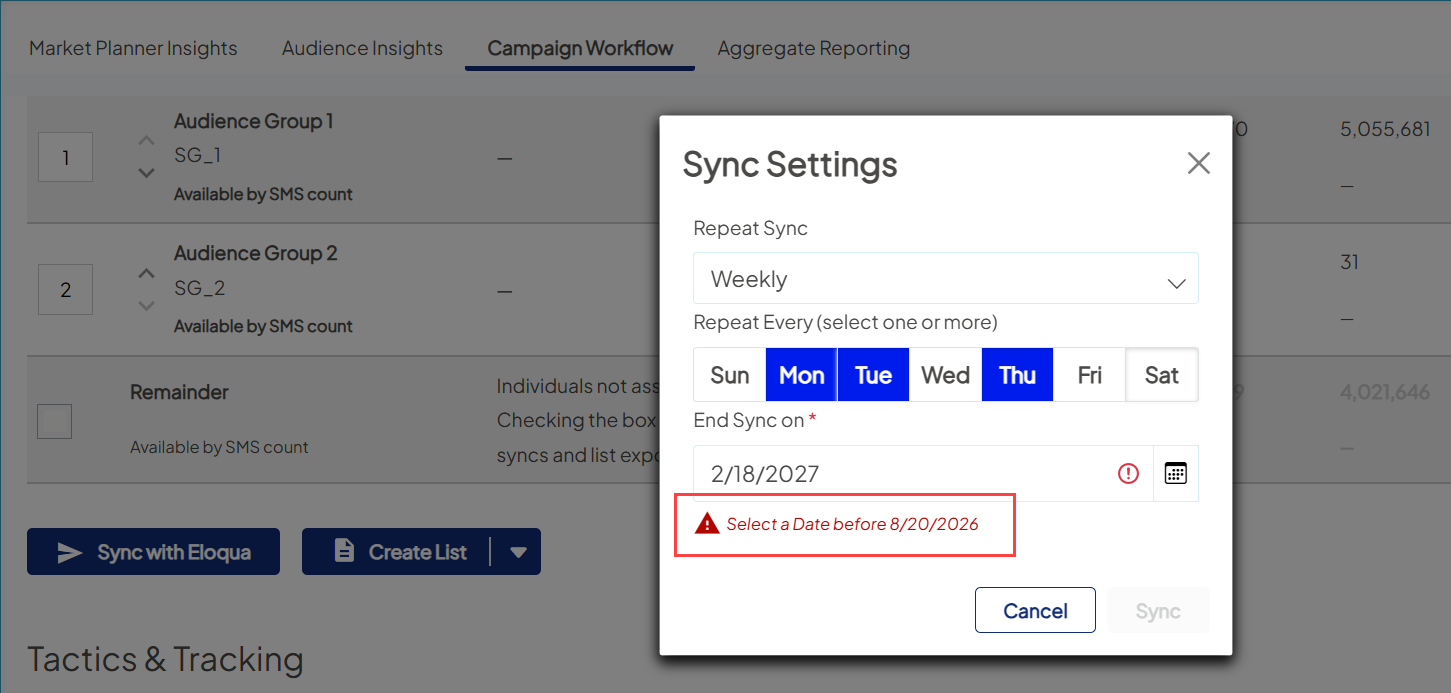
In Sync Settings, define how often this audience will sync to marketing automation.
- Weekly: choose to sync either one day or several days of each week.
- Nightly: sync to marketing automation each night.
- Click the Sync button.
This could take a few minutes depending on the size of the audience being synced.
Edit, pause, or end Sync
New audience syncs include an automatic end date based on how often the sync runs. This prevents lists from syncing indefinitely to help support platform performance and keep your marketing automation tools clean and efficient.
This prevents lists from syncing indefinitely in the platform and helps keep your marketing automation tools clean and efficient.
Default end dates by frequency:
- 2x per week or less: 365 days (1 year)
- 3x per week or more: 183 days (6 months)
You can still manage your sync schedule:
- At creation: Adjust the end date to a shorter timeframe if needed.
- After creation: Edit the sync at any time to update the end date.
- Extend a sync: When you edit a sync, the maximum duration resets from the date of your update, allowing you to extend it as needed (up to the allowed maximum).
Pausing or ending a sync before the end date immediately stops new audience updates from being sent to your marketing automation tool.
Other help content
 Ignite Growth Platform
Ignite U LIVE Webinar - February 25, 2026
Holly Fronk and Mike Stevenson discuss: opportunities to connect your data for richer insights, multi-campaign reporting with knowledge of exciting rollouts, and hIgnite is investing to make campaigns more effective and easier to deploy.

