Tactics and tracking
With campaign tracking in Ignite Growth Platform, activites can be attributed directly to your marketing efforts, from Unmastered records, aka Leads (form submits, HRA completes, inbound calls), to actual visits that meet the campaign objective.
The tracking ecosystem includes 3 components:
- Trackable URLs
- Capture script
- Web forms
Together, they provide critical visibility into the patient journey and prove campaign impact through the comprehensive reporting in the platform.
Trackable URLs
In the Tactics & Tracking section of your campaign, you generate trackable URLs to place in marketing messages by channel and drive users to your landing page. The URL builder ensures it is properly formatted with parameters to track and report on response activity.
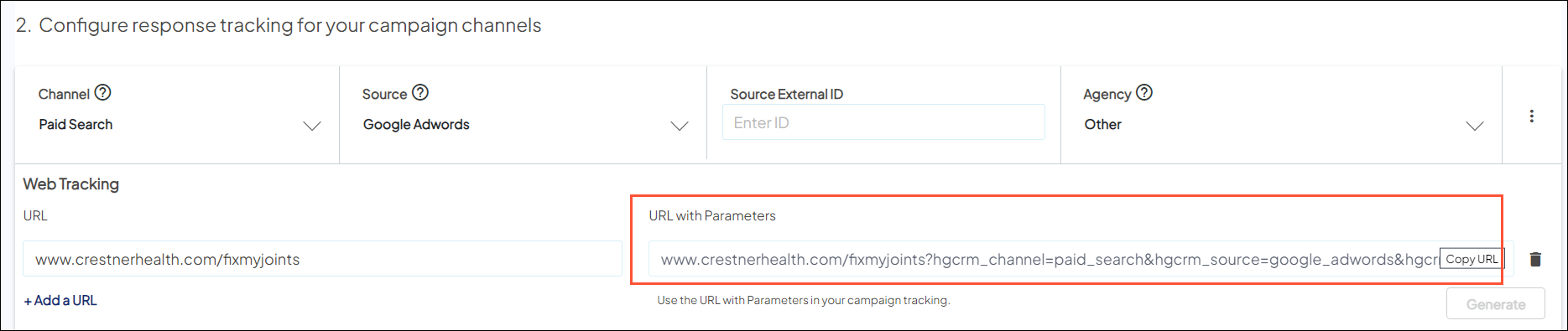
Capture script
During implementation, the WebMD Ignite capture script (also called “Orbit”) was installed on your health system website.

When a person arrives on your campaign landing page via the trackable URL, the script recognizes the parameters from the URL and adds that data to hidden fields in the form on your page (see below).
Web forms
You can add forms on your campaign landing pages which include hidden fields (templates provided during implementation and accessible in marketing automation). These fields are populated by the Capture script—identifying anyone who came to the page via your trackable URL.
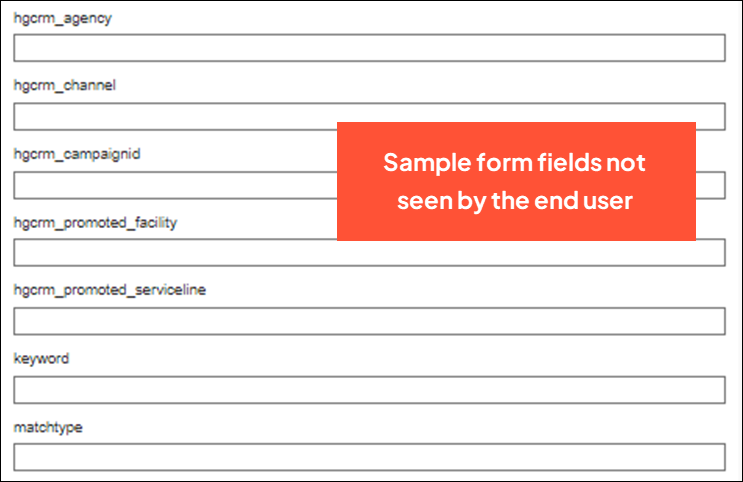
Once a form is submitted, the data they’ve entered and the data in the hidden fields is processed in real time and sent to your marketing automation. After syncing overnight, the data is passed back to Ignite Growth Platform for Campaign Reporting, as well as retargeting opportunities where you can start the cycle again.
Learn more about how tracking works with forms, including what reporting is available based on the data captured.


