Change the order of Audience Groups
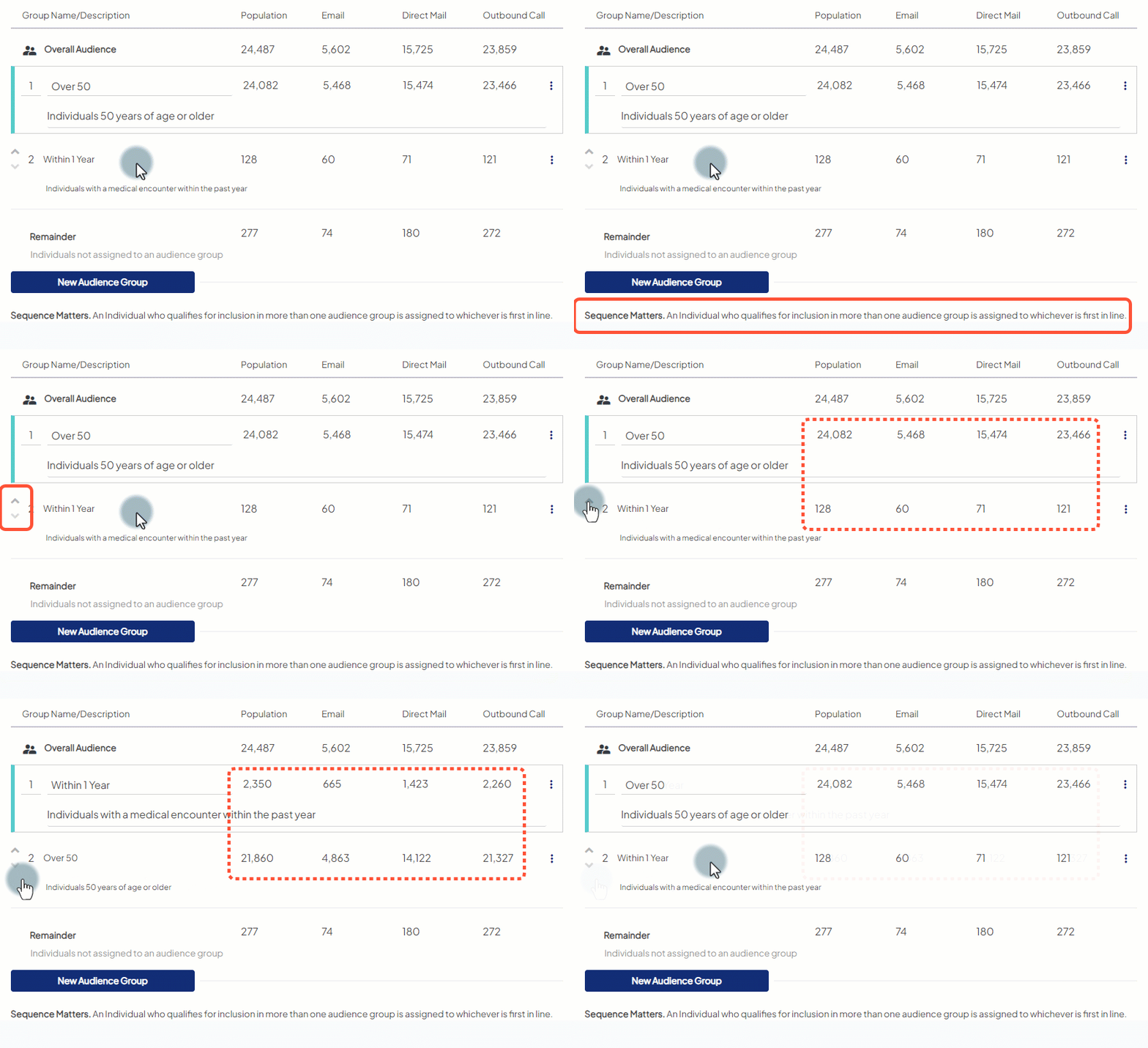
On the Audience Groups tab, Audience Groups are numbered in ascending order (top to bottom). Each Audience Group has an up arrow and down arrow you can click to change its placement within the overall sequence.
- Use the up arrow to move a given audience group ahead of the group directly above it.
- Use the down arrow to move a given audience group behind the group directly below it.
When creating audiences with only Mastered Persons records, the order is important: individuals will be captured in the first group that they meet the group criteria. Any subsequent groups with criteria they also meet will not capture those individuals. This is why changing the order of groups can change the number of individuals in each group (demonstration below).
If your audience has BOTH Mastered and Unmastered records, the order is less important and, when it comes to deduplicating the Mastered record will always take precident over an Unmastered record with the same email address or phone number (when deduplication of email address or telephone number occurs, Mastered records will persist in the audience along with all its other data and the Unmasatered record will be removed from the audience.
Take care when ordering Audience Groups to ensure you get the results most meaningful to you. You can define your Audience Groups in ways that minimize overlap when possible. For instance: defining one Audience Group with criteria of "Age 0-49" and another with "Age 50+". Since an individual cannot be two ages at once, they cannot meet both criteria at the same time.