Demographic Report
Use the Demographic Report to evaluate the demographic details of the individuals included in:
- Your target audience as you build it; -OR-
- The direct mail lists or outbound call lists you create.

If the audience includes a mix of Mastered and Unmastered records, the report will include demographics of only Mastered Persons. Demographic data are not available for audiences that include ONLY Unmastered Persons,
Content/format of the report
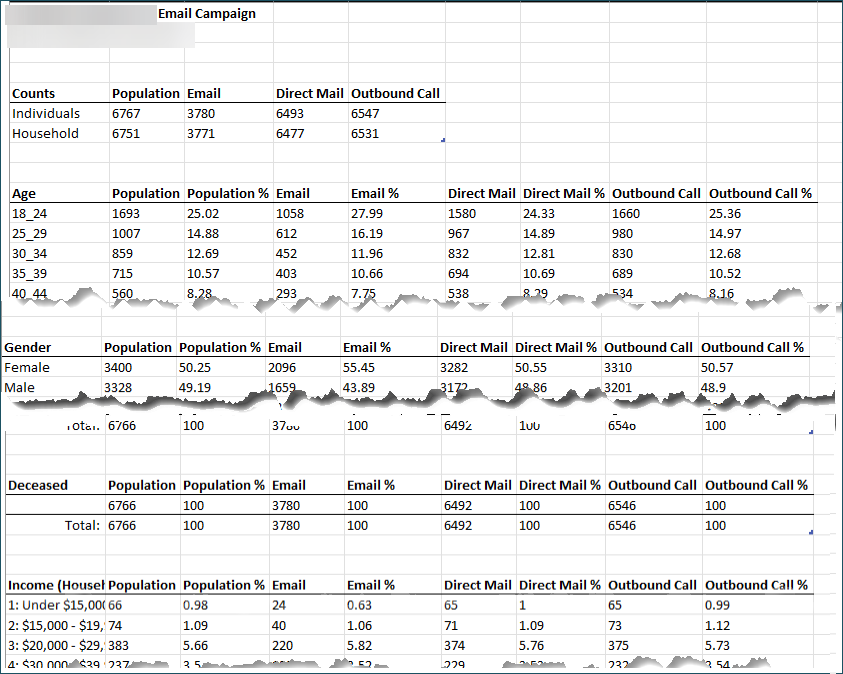
The Demographic Report is a Microsoft Excel spreadsheet with the following tabs:
- Overall Audience tab. Reflects the demographic details of the individuals in the Overall Audience.
<audience group> tab(s). One tab per audience group in the target audience. Reflects the demographic details of the individuals in the respective audience group. Audience Group> tab(s). One tab per Audience Group in the Target Audience. Reflects the demographic details of the individuals in the respective Audience Group.- Remainder tab. Reflects the demographic details of individuals in the remainder of the audience (only included in reports downloaded for Target Audiences).
Per tab, you can find the list details, overall counts, and counts per demographic categories.
If you dedupe the list by household, the counts in direct mail/outbound call downloaded reports represent the number of households, rather than individuals.
List details
- The name of the Target Audience OR the name of the Audience Group OR Remainder (based on the specific tab’s purpose as described above).
- Email address of the user who generated the report.
- Date/time stamp (EST time zone) when the user generated the report.
Overall Counts
The columns reflect the counts of individuals/households and their availability per Email, Direct Mail, and Outbound Call marketing channels.

Demography category counts
The report breaks down the number of individuals (or households, if deduped by household) and percentage of population overall and per channel availability across the following demographic categories:
- Age
- Gender
- Deceased
- Income (Household)
- Children Present
- Recency Frequency(RF6)
- Perceptual Profile
- Payor Category
- Marital Status
- Education
- Occupation
- Head of Household
- Race
- Solicitability
- Postal Code
The report does NOT display categories with zero counts. Example: If no individual falls into the age range of 35-39, then that age range is not represented in any way under the Age demographic category.