Data flow with Eloqua
Ignite Growth Platform supports the flow of data to Eloqua to perform online marketing AND from Eloqua back to the platform to report response activity. Use the following to understand the flow of data between Ignite Growth Platform and Eloqua.
From Ignite Growth Platform to Eloqua
When you choose Sync with Eloqua for a target audience in a campaign in your Ignite Growth Platform, you kick off a process that:
- Sends selected identifying data of the target audience’s current members from your platform to Eloqua -AND-
- Performs several tasks in Eloqua to prepare for online marketing.
The result of the send process is an Eloqua segment (the Eloqua term for audience) is created that mirrors your target audience. Eloqua campaigns support email marketing for the members of your target audience.
The current members of a target audience are those individuals who qualify for the criteria at the time the sync process is started.After this, a recurring nightly process updates Eloqua contact records with individuals’ membership statuses - either Yes or No - as individuals can qualify (be added to the segment over time) or disqualify (be removed from the segment over time) for Ignite Growth Platform’s target audience (and audience group) criteria.
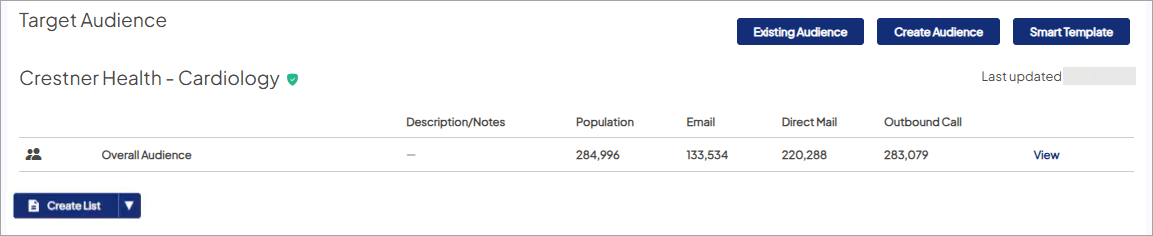
Eloqua dataThe sync process includes the tasks detailed here.
Creates an Eloqua Segment and Custom Object
Eloqua Segment
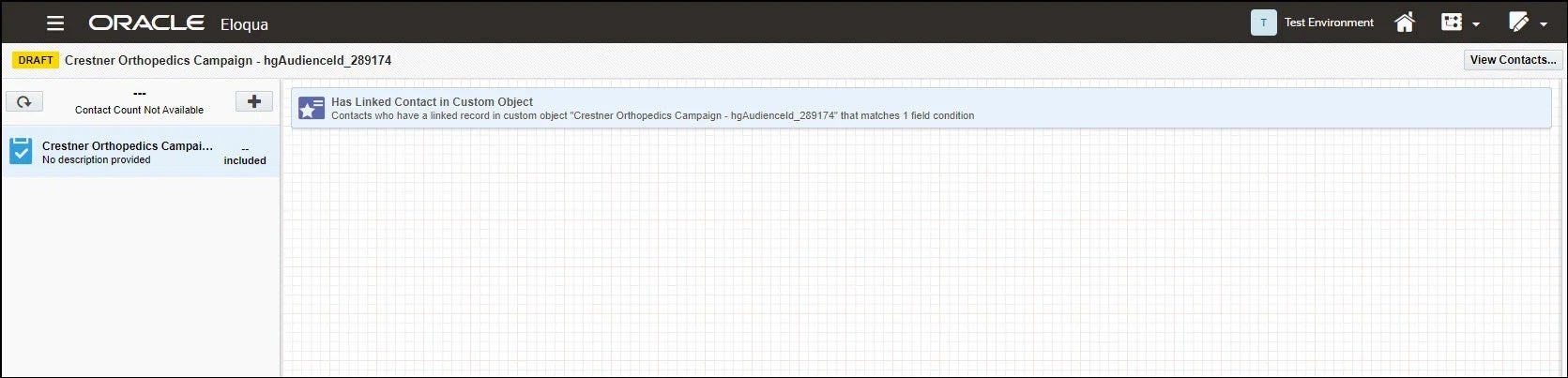
The sync process automatically creates an Eloqua segment. The segment, by default, contains an Eloqua filter to include individuals with active membership in the Ignite Growth Platform’s target audience as well as Audience Group information contained in the Custom Object. This segment can be used in a blank Eloqua campaign. Learn more about Eloqua Segments.
To use the segment in an Eloqua campaign, you must manuallyadd the auto-created segment into the campaign. Only the auto-created segment is designed to capture the response activity of the campaign's target audience.This process is require if you want to track the audience's behavior - otherwise, tracking of the platform created audience will not occur.
Things to note:
- You can add additional filters to the auto-created segment.
- You can create more segments beyond the auto-created segment. To include your target audience in a segment you create, be sure to create/include one filter that is patterned after the custom object filter in the auto-created segment.
Updates Eloqua’s Master Contact List
Eloqua stores all individuals in one master contact list. The sync process updates Eloqua’s master contact list by:
- Adding target audience members (and their identifying data) to the master contact list when they do not already exist in the list.
- Updating (if needed) the identifying data for those target audience members who already exist in the master contact list.
The identifying data passed to Eloqua includes the unique internal identifier for each individual in the target audience so we can tie response activity back to the individual and then pass that back to Ignite Growth Platform for reporting purposes.
Using Audience Groups and Custom Objects
Since Eloqua stores all individuals in a Master Contact list, each member of a given target audience is assigned a unique tag so you can perform online marketing campaigns in Eloqua for that specific audience or audience group.
To accomplish this, the Eloqua feature used is called a Custom Object (learn more).. Custom objects allow you to store supplemental data about individuals and link that data to the individuals’ contact records that live in Eloqua’s Master Contact list.
Essentially, the Custom Object serves to tag Audience Group members of a given target audience to distinguish them from other individuals in Eloqua’s Master Contact list. Although a given individual can be tagged as part of many Custom Objects (i.e., included in more than one gnite Growth Platform target audience), an individual is only ever represented once in Eloqua’s master contact list.

The sync process automatically:
- Creates a Custom Object as a counterpart to the Ignite Growth Platform target audience.
- Labels the Custom Object with the name of the Ignite Growth Platform target audience.
- Populates the Custom Object with a subset of the identifying data (like Audience Groups) passed from Ignite Growth Platform to Eloqua.
The subset of identifying data stored in the Custom Object includes the following key data points:
- Email address: used to tie the individual back to Eloqua’s Master Contact list.
- Audience Group: the Ignite Growth Platform target audience group to which the individual belongs. This data point can be used to further segment the Eloqua campaign and/or Eloqua segment (e.g., different versions by age or gender)
- Audience Membership: reflects whether the individual is currently tagged as a member of the Ignite Growth Platform target audience and therefore available for marketing. As part of the sync process, a link is established between Ignite Growth Platform and Eloqua that facilitates continuous updates. As individuals qualify or disqualify for the target audience’s criteria, a nightly process updates their membership status in the target audience’s Custom Object counterpart.
Identifying Data
When a target audience is synced to Eloqua, the process sends selected identifying data of that audience to Eloqua. These data points can be used when building your Eloqua marketing campaign (NOTE: the bold data points are required for mastering):.
- First name
- Middle name
- Last name
- Age
- Birth date
- Gender
- Head of household
- Language
- Email address
- Home phone
- Mobile phone
- Address line 1
- Address line 2
- City
- State
- County
- Postal code
- Market areas
- Unique internal identifier
- Prefix
- Suffix
- Household number
- Race
- Children present
- Marital status
- Household income range
- Payor category model
- Payor category model confidence
- Perceptual profile
- Recency frequency
- Education
- (Audience) Group
When you sync a target audience with Unmastered records to Eloqua, the process sends available identifying data (at least email address) of those people to Eloqua. You can use any of these data points in building your Eloqua marketing campaign.
And, finally, if you are syncing an audience that includes both Mastered and Unmastered records, the identifying data listed above will be sent for the Masatered records as long as those fields are populated with information.
NOTE: When using Unmastered records be mindful when applying criteria in Eloqua as there are differences of available identifying data.
From Eloqua to Ignite Growth Platform
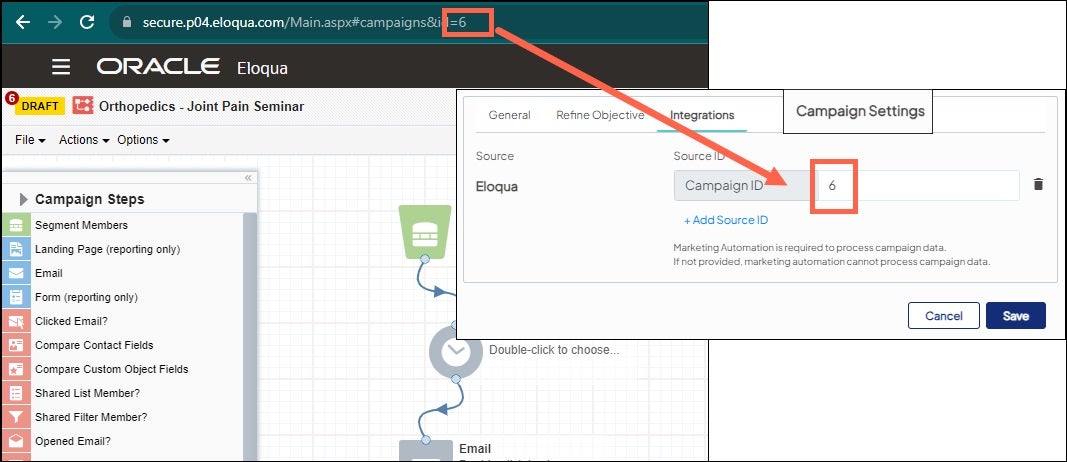
To report on campaign performance, you MUST enter your Eloqua campaign ID in Campaign Settings of the Ignite Growth Platform’s campaign before you activate your campaign in Eloqua. We run a nightly process that passes response activity for your Eloqua campaign to the solution, matching individuals’ response activity back to their unique product records.
If a campaign has a form as its call to action (CTA), and that form has only email address or phone # as required, an Unmastered record will be created and synced back to Ignite Growth Platform nightly. They will then be available for retargeting, and reporting for this campaign.
Reminder that any Unmastered records used for retargeting are NOT included in reporting. Only responses (e.g., form submissions) to the campaign's CTA(s) are included in the Leads metric when reporting only includes Mastered records and Leads and Matched Leads (if matched to a Mastered record) if "Include Unmastered Persons" toggle is on.



