Audience Groups
You can subdivide your Overall Audience into Audience Groups so you can tailor your campaign message, channel, images, etc. to suit your audience members and/or campaign purpose.
You create Audience Groups and apply criteria per group on the Audience Groups tab, which is available when you create/open an audience in Audience Insights.

Audience Group metrics
The Audience Groups tab reflects the following metrics for the individuals qualifying for the Overall Audience:
- Population: Number of individuals currently in the audience.
- Email: Number of individuals for which you have an email address.
- Direct mail: Number of individuals for which you have a postal address.
- Phone: Number of individuals for which you have a phone number.
- Available by SMS count: Number of individuals for which you have an SMS enabled phone number.
As you add Audience Groups and apply criteria, the same metrics display for the individuals qualifying per Audience Group.
Audience Group rules
- Only individuals from your Overall Adience are eligible to qualify for Audience Groups. As a result, the criteria you apply at the overall audience level must be broad enough to include all the individuals needed across your entire campaign.
- An individual can be part of only one Audience Group created for an overall audience. When an individual qualifies for multiple groups, we assign the individual to the group for which it is first eligible.
- Since the order of groups determines where some individuals are assigned, altering the order of the groups affects the groups to which individuals are assigned. As a result, you may notice a change in the metrics as you alter the order of groups.
- For audiences that include both Unmastered and Mastered Persons records, the Mastered record will always be selected when there are Unmastered records that match it on email address or telephone number. Therefore, the Audience Groups for mixed audiences can be in any order.
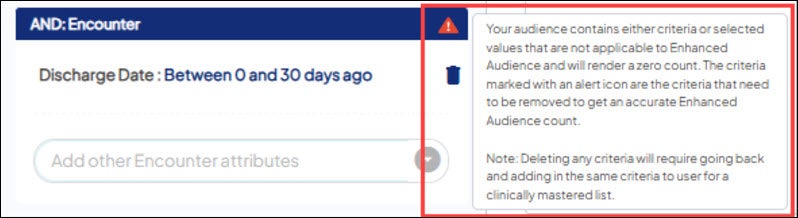
- Certain criteria (such as options in Encounter, Demographics, Models, and others - learn more) are not applicable to Unmastered Persons. If selected for an audience including Unmastered Persons only, the below message will display. If the audience is mixed and includes both Unmastered and Mastered Persons, any count will be for only Mastered Persons.
Remainder group
As soon as you create your first Audience Group, the application automatically creates a Remainder Group. Any individual in the Overall Audience who does not qualify for an Audience Group falls into the Remainder Group.
In Audience Insights on the Audience Groups tab:
You can customize the name of the Remainder Group by clicking "Remainder" and a free-text field will appear.
Once you attach the target audience to a campaign, you can choose to include the Remainder Group's members as part of the audience for the campaign, just like any other Audience Group.


