Deduplicate an audience and prioritize channels
You can deduplicate the individuals in an audience so they fall into only one marketing channel and receive only one direct (push channel) marketing communication. You can also prioritize the order of channels that audience members fall into first, second, etc. For example, you can make email the first priority and phone (including SMS) the second priority. Anyone with a valid email address will receive the message through the cost-effective email channel. Anyone without an email address but with a validated SMS enabled phone number will receive the message via SMS. And lastly, anyone without either a valid email address or SMS enabled phone number will get the message via direct mail.
Deduplicating the individuals within a given audience allows you to maximize your budget since you’re contacting them only once.
- In Campaign Workflow and your campaign, on the Overview tab, choose Target Audience to scroll to that section.
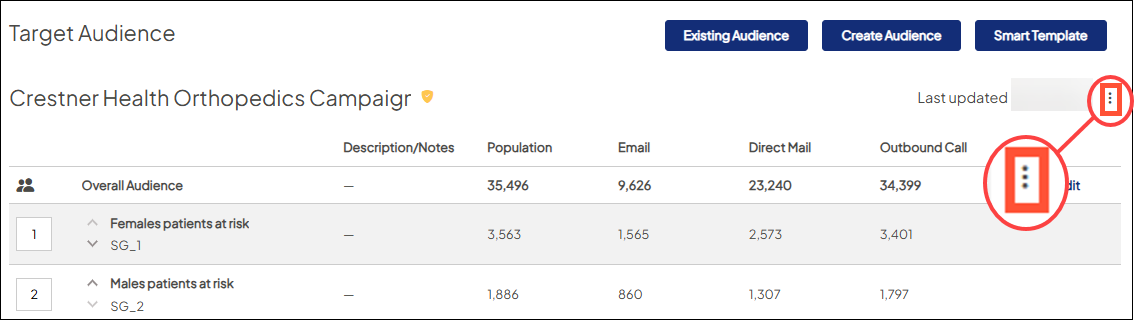
- Click the overflow menu icon and select Audience Settings.
- In Audience Settings, click the Deduplicate Channels checkbox.
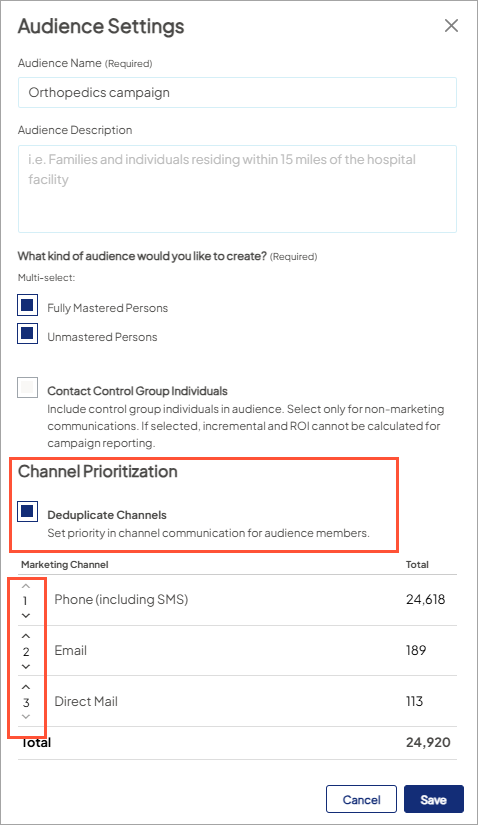
The list of marketing channels expands, displaying the deduplicated number of individuals available per marketing channel.
- To alter the order (priority) of the marketing channels, use the up and down arrows to move a given channel to a different location in the list.
- The deduplicated number of individuals per marketing channel changes accordingly.
- Click Save. The Overall Audience’s counts per marketing channel match the numbers displayed per channel on the Audience Settings window.


