Ignite Service Line categories & Custom Service Lines
Ignite Service Lines are made by marketers, for marketing. They provide you more accurate return on investment (ROI) reporting for campaigns and allow you to do a better job targeting the right people for your marketing. Plus, Ignite Service Lines gives more accurate insights into who is already being treated by your health system, regardless of their treatment’s phase, and helps to improve new/new-to-service patient targeting.
What makes Ignite Service Lines different
Traditionally, service lines categorize visits based on “what” was done, or “who” was seen. Ignite Service Lines categorizes visits based on “WHY.” The impact is more intelligent inclusion or exclusion of individuals for marketing and your ROI reporting captures more ancillary visits associated with your call to action. For example, if you're reporting on an orthopedics campaign and your objective is to increase volume of visits for hip replacement surgery, a traditional service line categorization would miss the visits leading up to and after the surgery. Ignite Service Line categories capture and include these in ROI reporting.
Ignite Service Line categories are assigned to all visits using a contextual based logic system. Below is the order of visit data the assignment logic runs through to determine what code to use for assigning to an Ingite Service Line when multiple suitable values are present.
- Oncology Diagnosis Check
- MS-DRG Check
- Primary Procedure Check
- Primary Diagnosis Check
First, Oncology Diagnosis. This stance was chosen since when cancer has been diagnosed, nothing else matters, because a lot of services will be in support of oncology treatment. While it's true that some of them may not be and they would have occurred anyway, that difference isn’t always obvious or clear If any cancer diagnosis is found, the visit is assigned to the appropriate oncology sub service line based on that cancer code.
Second, MS-DRG code. If found , and it seems like a good fit based on WebMD Ignite’s proprietary business logic, then it is attributed to the appropriate service line based on that MS-DRG code.
Third, Procedure code. The primary procedure code is evaluated to define the attribution to the service line. If the procedure code does not share enough information about why the procedure was done, then the logic moves to the next step.
Fourth, Diagnosis code. The primary diagnosis code is evaluated to define the attribution to the service line. The diagnosis can further offer context to the visit allowing for appropriate service line attribution.
Why do we assess the procedure code before the diagnosis code in the logic system? If a procedure is specific enough, that procedure will be categorized to the appropriate service line category.
For example, heart valve surgeries only happen to hearts and are always assigned to Cardiology. Our logic system is trained to “skip” non-specific procedure codes so we can dig deeper to understand the “why” by looking at the diagnosis codes. For example, the “biopsy of a solid organ” procedure is not specific, so the system would look to the diagnosis codes and if it finds “non-cancerous stomach tumor”, the system would classify the visit as Digestive Health.
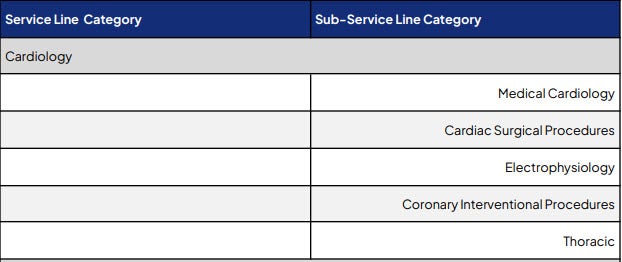
Download the Ignite Service Categories
Click the image to download the PDF.
Custom Service Lines
Your organization may be sending its own defined service lines - referred to as Custom Service Lines. Custom Service Lines DO NOT replace the Ignite Service Lines.
If Custom Service Lines are provided, these are available in addition to the Ignite Service Line as follows and can be found in Ignite Growth Platform as follows:
- Audience Insights - can be used for inclusions and exclusions in audience creation
- Campaign Workflow - can be used as an objective in Campaign Settings
- Campaign reporting - will show results based on the Custom Service Line selected
- Ad-hoc reporting - the WebMD analytics team can use them for ad-hoc reporting

If a visit is sent with no Custom Service Line provided, it will fall into NO Custom Service Line. There is no default “OTHER” bucket for Custom Service Lines. It will still have an assigned Ignite Service Line (as defined above).

Tip: Ignite Growth Platform service line naming conventions
- Audience Insights: Service Line > Ignite Service Lines & Custom Service Lines; Sub-Service Line > Ignite Sub-Service Lines & Custom Sub-Service Lines
- Campaign Workflow: Campaign Settings > Promoted Services > Ignite Service Lines & Custom Service Lines; Refine Objective > Sub Service Lines > Ignite Sub-Service Lines & Custom Sub-Service Lines
- Campaign Reporting: Objective Settings > Service Category > IGP & CUST; Service Sub-Category > IGP & CUST


