Audience Insights
To maximize effectiveness of engagement efforts, marketing teams must deploy highly personalized and relevant marketing campaigns targeting the likeliest candidates for healthcare services.
Audience Insights offers user-friendly audience building capabilities that empower healthcare marketers to easily create target audiences using demographic, household, and clinical information, combined with non-clinical interactions and predictive models.
You can decide to include Mastered Persons or Unmastered records or both for targeting.
Audience Insights offers three methods to build your list of individuals and provides immediate feedback about those individuals as you refine your audience.
Overview: Build a target audience
-
Create a target audience
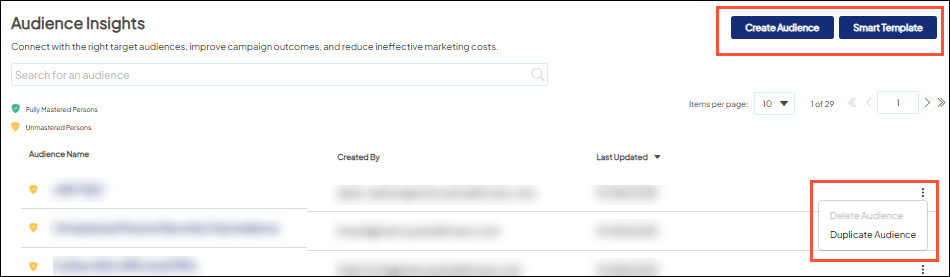
Use one of 3 options to create an audience:
- Duplicate an existing target audience,
- Use a Smart Template for guided assistance
- Create an audience from scratch. Learn how to create a target audience.
-
Refine your Overall Audience
When you create a target audience, the initial audience created is your overall audience. You can add criteria from the criteria library or modify existing criteria to define your overall audience, using the displayed metrics and map to evaluate the individuals in your audience as you alter the criteria.
-
Create Audience Groups (optional)
-
You can subdivide your Overall Audience more finely into Audience Groups when you want to tailor aspects of the campaign message, vehicle, etc. to more closely suit the audience members. Learn how to work with audience groups.
 If creating an audience including both Mastered Persons & Unmastered records, it's best practice to use Audience Groups to apply criteria as there are filters that do not apply/cannot be used with Unmastered records. This avoids the "Invalid Criteria" alert from displaying and you don't have to make any adjustments after creating your audience.
-
-
-
Link to campaign
Go to Campaign Workflow to attach your target audience to a campaign and launch marketing efforts. Learn more about Campaign Workflow.