Lower-confidence linking
Unmastered Persons records provide the opportunity in Ignite Growth Platform to increase leads for retargeting and relationship nurturing.
And, with Lower-Confidence Linking methodology, you have the ability to recognize encounter revenue for persons whose engagement with a campaign created Unmastered records.
What is Lower-confidence linking?
Put simply, Lower-confidence linking is a matching algorithm that, when applied, associates an Unmastered record with a Mastered record based on how similar the records match on available data. When the records are linked, the Mastered Person’s downstream activities and visits are included in reporting.
How does it work?
Unmastered records are created when less than all required information for mastering is obtained and loaded into your platform. They include, at a minimum, a valid email address or phone number (provided by the submitter), and the source and date of the activity (auto-populated).
For example, an Unmastered record, created from a health risk assessment (HRA) submission (used as a campaign’s call to action) that required just an email address to get results would look like this:
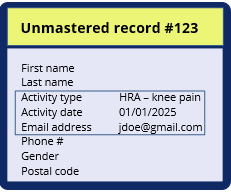
Using standard (default) reporting methodology, which applies only to Mastered Persons, the above record would be included in reporting as a lead only. Tracking of that individual in reporting ends there.
With Lower-confidence linking, Unmastered records are matched to Mastered records based on a matching algorithm.
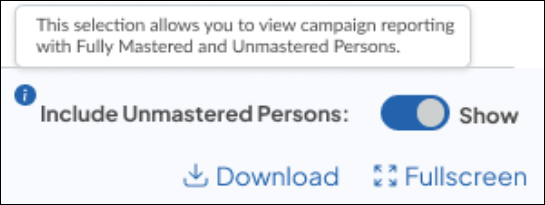
Toggle on!
The process
The process, which occurs nightly, consists of 5 steps:
Step 1: Gather all Unmastered records for the campaign
Step 2: Match to existing Mastered records
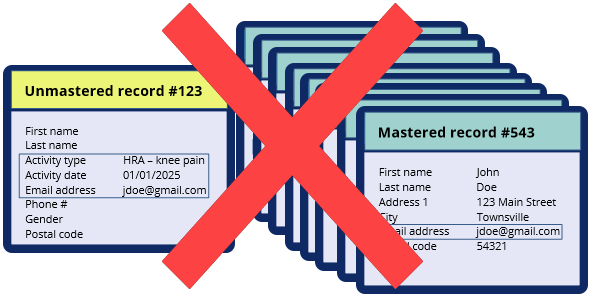
Step 3: Delete any Unmastered recordsthat match to 8 or more Mastered records
Step 4: Generate a match score for each matched record
Step 5: Select the match with the highest match score between Unmastered and Mastered records
An example
Let’s walk through the steps using our HRA Unmastered record in a simplified example (empty fields removed for ease of reference).
Step 1: All of the campaign’s Unmastered records are identified and gathered together
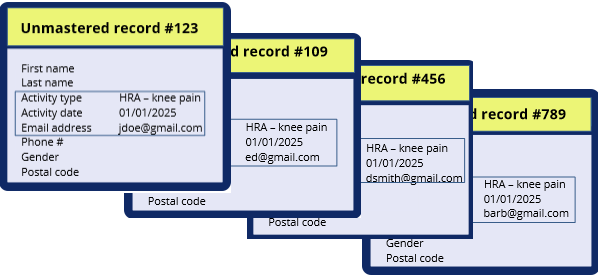
Step 2: Match to existing Mastered records
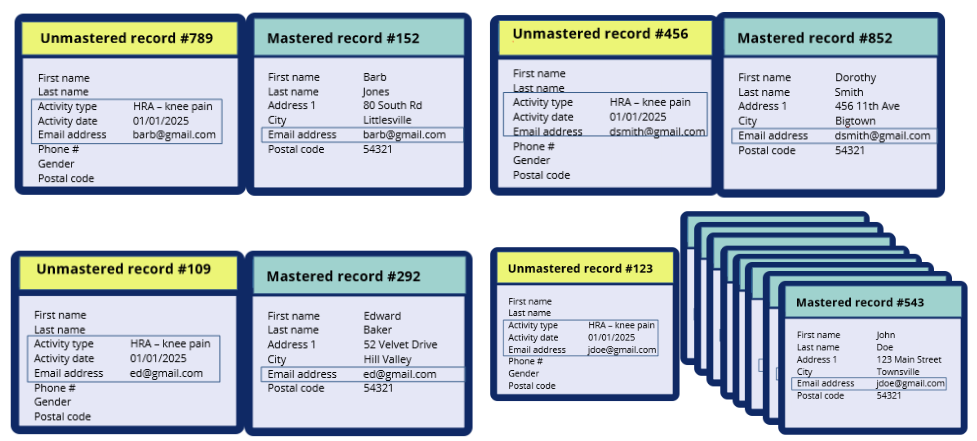
Step 3: Delete records where the Unmastered record matches to 8 or more Mastered records (these likely are retirement homes, rehab centers, hospitals, nursing homes, etc).
Step 4: Generate a match score for each matched record
- Compare the Unmastered demographic data with the matched Mastered record - 2 scoring methods are applied:
- The “Jarowinkler Similarity Match” algorithm is used to generate similarity score for first name, last name, suffix, address line 1, city & email address
- Score between 0-100 for each available field
- Exact match rule applied to state, postal code, birth date, home phone, mobile phone & gender
- If match, Score = 100
- If no match, Score = 0
- Add all match scores above to generate a total match score for Unmastered Person ID combination
- Exact match rule applied to state, postal code, birth date, home phone, mobile phone & gender
With only an email address, the similarity match score is generated.
Score = 100 - it’s an exact match
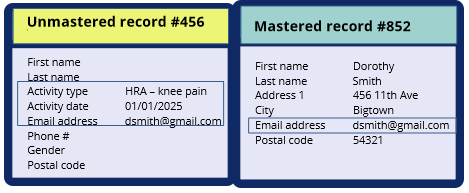
Step 5: Select the match with the highest match score between Unmastered and Mastered records
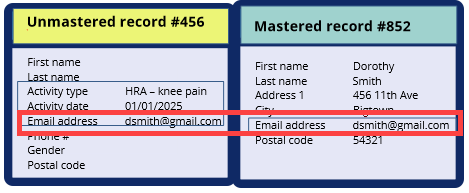
In this case, Dorothy Smith’s downstream activity and visits will be included in the campaign reporting.
Another example
Let's look at an example when more demographic fields are available for the matching process - First Name, Last Name, Email Address, Home Phone, Postal Code. Using phone and email address, we match to 2 Mastered persons records:
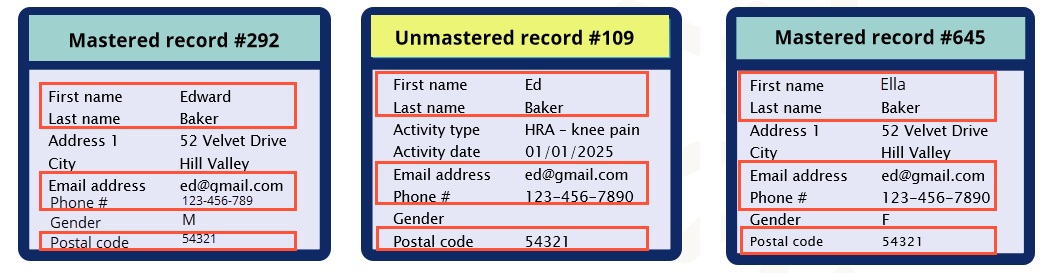
Scores compared:
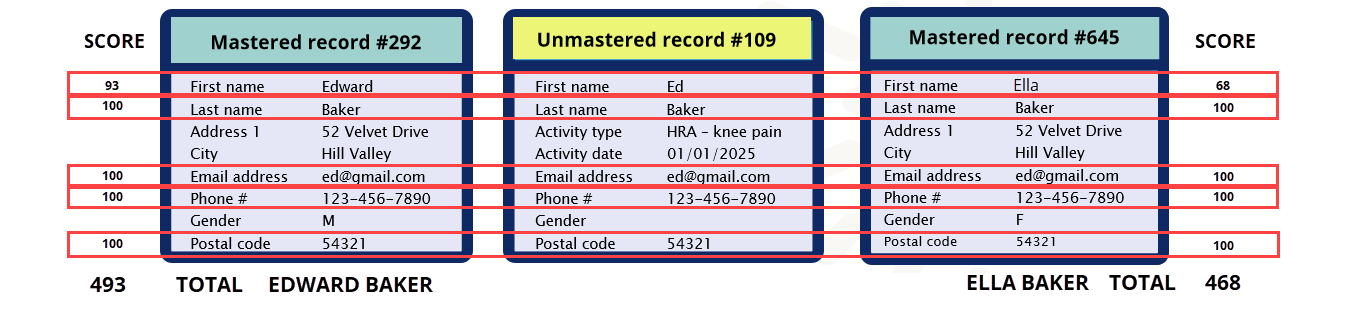
Edward Baker score = 493 and Ella Baker score = 4687
Ed Baker Unmastered record #109 is matched to Edward Baker Mastered record #1359 . Edward Baker’s activities and downstream visits are included in campaign reporting based on the lower-confidence linking methodology.
Additional considerations
To address any cases where there’s a match between more than one Mastered record, the following logic is also applied to ensure, as often as possible, the right Mastered persons are included in campaign reporting:
- Patient Bias
- The Unmastered Persons matching algorithm is biased towards patient matches since email address and phone number are likely to be available for patients only.
- Channel Attribution
- If an individual is both a Mastered contact and linked to an Unmastered record for a campaign, and in the process, is attributed to 2 separate channels, the channel associated with the Mastered record would override the Unmastered record for channel attribution
- Orthopedics campaign example:
-
Scenario 1 - Dorothy Smith’s Mastered record is included in a target audience and she receives an email regarding orthopedic services
Channel attribution = email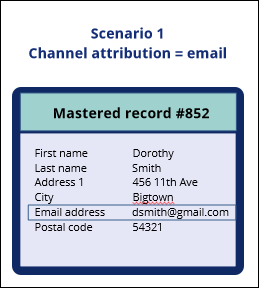
-
Scenario 2 - Dorothy Smith has an Unmastered record as she found and submitted a form to request more information about knee pain treatment - only her email address was provided on the form
Channel attribution = display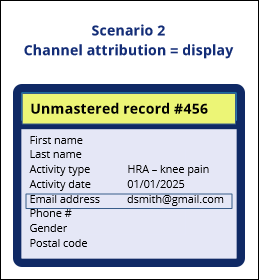
-
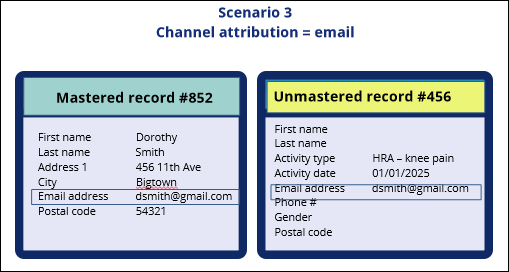
Scenario 3 - Dorothy’s Mastered record is included in a target audience and receives an email AND finds and submits a form creating an Unmastered record
Channel attribution = email because the Mastered record’s channel overrides the Unmastered record’s channel
-
- Orthopedics campaign example:
- If an individual is both a Mastered contact and linked to an Unmastered record for a campaign, and in the process, is attributed to 2 separate channels, the channel associated with the Mastered record would override the Unmastered record for channel attribution