ROI Dashboard tab
The ROI Dashboard tab provides your campaign performance summary by channel.

To see a comparison of the ROI dashboard when reporting includes only Mastered records and when Unmastered records are included, click here.
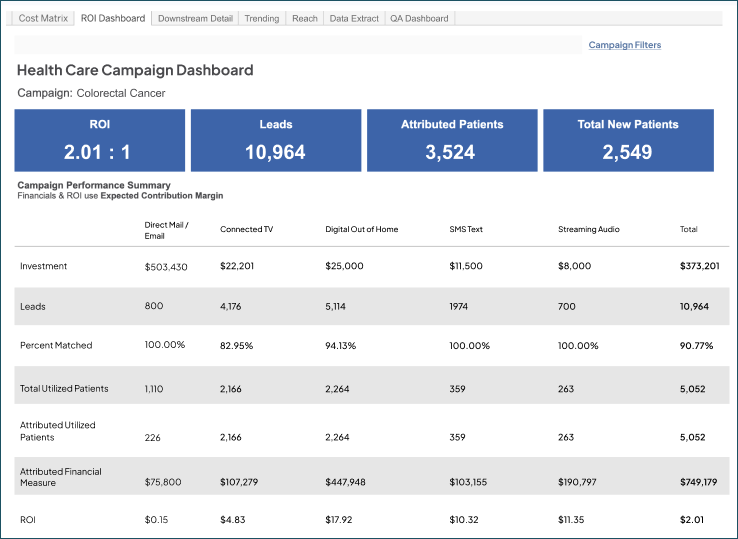
Channels
- Direct Mail/Email: Combined in the ROI Dashboard tab for higher statistical significance but not for other performance metrics. This is done because most direct mail communications are followed by email, which unfairly favors email.
- Display: Derived from tracked activities with Channel of Display
- Paid Social: Derived from tracked activities with Channel of Paid Social
- Paid Search: Derived from tracked activities with Channel of Paid Search
- SMS Text: Derived from tracked activities with Channel of SMS Text
- Other & Unknown: All other channels (mass media, video, etc.), along with unknown channels, which can be a quality metric to indicate you’re not capturing detail through our typical channel tracking and naming methodology ( e.g. ‘new channel’).
Campaign performance summary (by channel)
- Financials & ROI using [selected Financial Measure] CM
- Investment: Populated from the Cost Matrix tab.
- Leads: Consideration conversions by channel (Forms, Calls, HRAs, Custom Activities); these are not deduplicated in the new dashboard or in Ignite Growth Platform today.
Note: Counts are not unique until they are matched and become counted as unique patients in the patient totals. For example, if an individual fills out multiple calls to action, we will display a count of each individual call, form, or other activity received.
-
- Percent Matched: Percent of total leads we were able to match back to a Mastered Persons record within Ignite Growth Platform.
- Total Utilized: Number of patients with downstream visits from the campaign.
-
Attributed Patients: Number of patients the campaign can take credit for. These are over and above what would have come in anyway.
- 100% credit is taken for digital (pull) channel attribution because these individuals have expressed interest in the service by calling or completing a call to action such as a form/HRA. So, you'd expect to see the same number for Total Utilized and Attributed Patients.
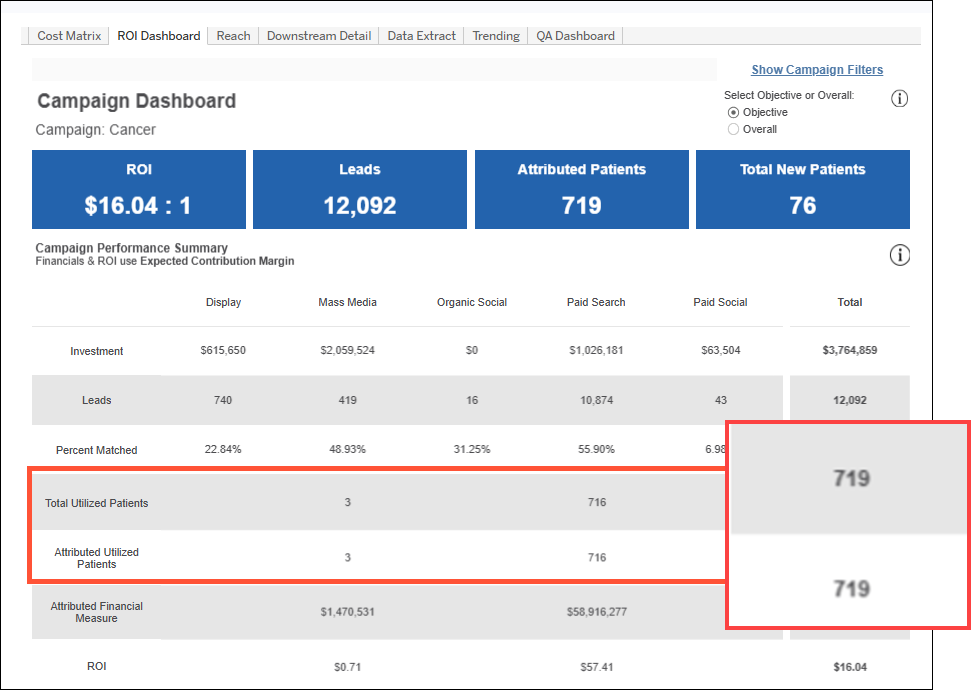
- For push channels (direct mail/email), we first remove any individuals that made a phone call or filled out a form. This “hand-raising” behavior means that their utilization gets attributed at 100%.
- The remaining attributed patients in push channels (direct mail/email) are calculated through the control group methodology, and you’d expect to see different numbers in total and attributed.
- ROI: Attributed value / cost
Tip: In order for ROI by Channel to populate, a channel must have both investment and downstream financials associated (ROI = Attributed Financial Measure / Investment).
Note: You can view email activity metrics (e.g., opens, sends, click-throughs, etc.) in marketing automation (Eloqua resource: Email reporting and metrics).


