
Optimize performance with audience sync end dates
We’ve introduced a proactive way to manage your audience sync schedules, while supporting Ignite Growth Platform health and reducing the load on your marketing automation tools.
What it is
When you create a new audience sync to Eloqua or Salesforce Marketing Cloud, a default end date will automatically be applied based on your sync frequency. These clear cut-offs help you stay ahead of your data management and enable an optimal in-platform experience and efficient use of third-party contact management systems.
How it works
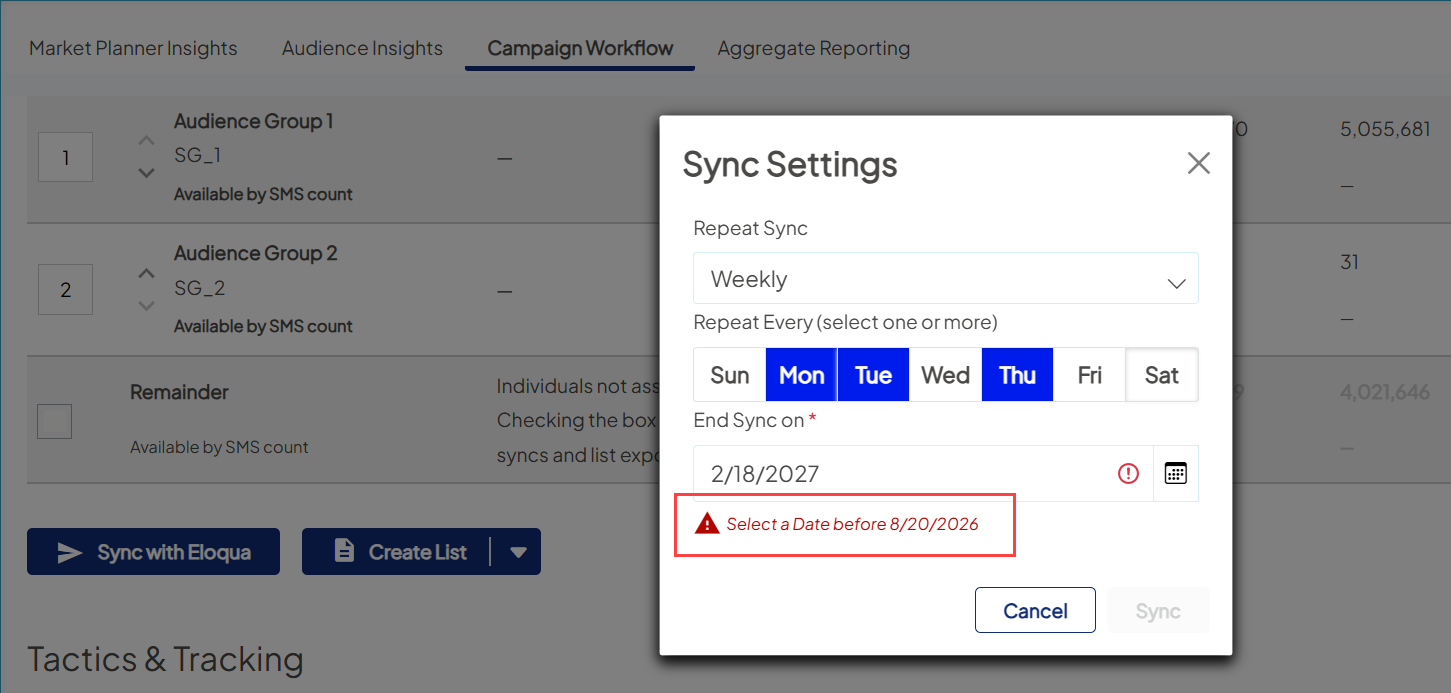
Defaults are determined by how often an audience is refreshed:
- Syncs scheduled 2x per week or less: 365 days (1 year)
- Syncs scheduled 3x per week or more: 183 days (6 months)
You maintain full control over your sync schedules:
- At creation: Adjust the end date to a shorter timeframe
- After creation: Update the end date at any time by editing your sync schedule
- Extend a sync: Renew the end date as often as needed, up to the maximum duration allowed from the date you edit.
Example: If you create a weekly sync on February 18, 2026, the default end date will be February 18, 2027. If you edit that sync on April 18, 2026, the platform resets "Today," allowing you to extend the end date to April 18, 2027.

Why it matters
- Faster platform: Reducing endless background syncs helps ensure an optimal experience for your team.
- Healthy integrations: Wrapping up older syncs prevents hitting contact record limits or cluttering your marketing automation tools with data you no longer need.
- Clean reporting: Ending syncs for completed campaigns stops the re-calculation of new audience members, providing a more accurate view of performance.
- Smarter syncing: Clear out forgotten or outdated syncs, so you can focus on your active audiences.
Coming soon
This release applies only to newly created audience sync schedules. On March 3 , we’re adding end dates to existing audience syncs and details will be shared at that time. Contact your Account Manager if you have any questions.
Looking further ahead, we’re planning smarter alerts for you right in the platform, including ways to identify and manage upcoming audience sync expirations right inside of the platform.


