Release notes: October 15, 2024

Your Favorites, front and center
With a new simplified view, it’s easier to access and manage your most important campaigns.
What it is
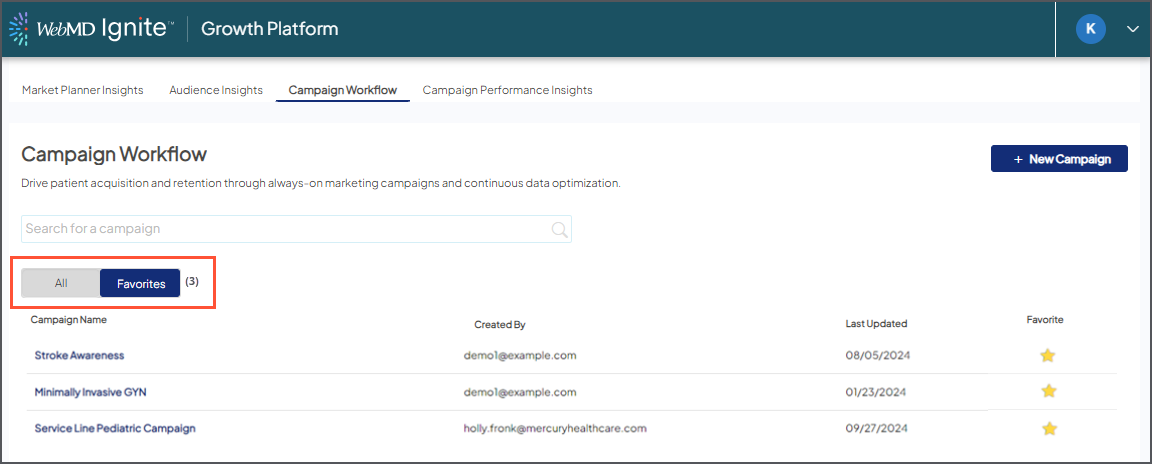
My Campaigns has been removed from Campaign Workflow, and the tabs replaced with a quick toggle for All Campaigns or Favorites.
How it works
The list view now defaults to the campaigns you’ve favorited. Any new campaigns you create are also automatically favorited and added to your lists, where you can easily view and/or remove them if needed.
To see all campaigns created by your organization, simply switch views.
Why it matters
Once Favorites were available, My Campaigns became less useful, since you don’t always create your own campaigns or the ones you often refer to. This new streamlined experience lets you focus on what matters most.

UI update for managed campaigns
If your campaigns are handled by our strategists, there may be some areas of the platform you won’t need to access or are getting upgraded for future use. Your Ignite team will discuss those with you, and you’ll now see a lock icon and note to let you know we’ve got it covered.

