Release notes: December 23, 2025
In this release: Express consent for SMS audiences | SMS reporting | Limited release: Aggregate Reporting | NCOA for patient data

Express consent: Send SMS with peace of mind
Our earlier release enabled you to create and export SMS audiences. With this update, you can now layer in their opt-in or opt-out status — helping ensure your text message campaigns are fully compliant.
What it is
Under the Telephone Consumer Protection Act (TCPA), marketing texts can only be sent to consumers who’ve given their express written consent through a non-SMS channel, like a web form or digital agreement.
This release makes that consent actionable in Ignite Growth Platform, providing an efficient, reliable way to:
- Load lists of phone numbers that have been opted into or out of your SMS marketing
- Attach consent status to individual numbers, creating a clear, verifiable record
- Automatically enforce consent rules in your SMS audiences to target only opted-in numbers
How it works
Setting up and sending your data
Like SMS activities in our previous release, SMS consent is a new data source. Contact your Account Manager to request access, and our implementation team will then work with you to get it configured.
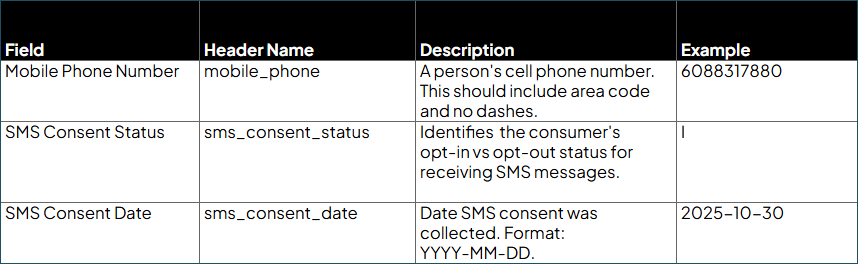
When you’re ready to send your data, use our new dedicated SMS Consent List Data Submission Guide for successful ingestion. Each record requires only three fields — mobile phone number, consent status, and consent date — along with optional demographics to round out the record.

Validating and enforcing consent
Once your file is submitted, the platform automatically validates phone numbers and consent dates to ensure data quality, then manages consent using these rules:
- Consent is tied to the phone number, not the person. Each phone number has its own consent status, which is then attached to any associated Mastered and Unmastered Person records.
- Most recent status wins. If a number has multiple entries (e.g., an opt-in from May and an opt-out from June), the system honors the latest timestamp.
- Consent does not transfer. If a person has two phone numbers (e.g., home and mobile), an opt-in for one number never carries over to the other. Each number must have its own express consent.
Building and exporting compliant audiences
SMS eligibility in your platform is now based on express consent by default. This change is reflected in your usual workflow:
-
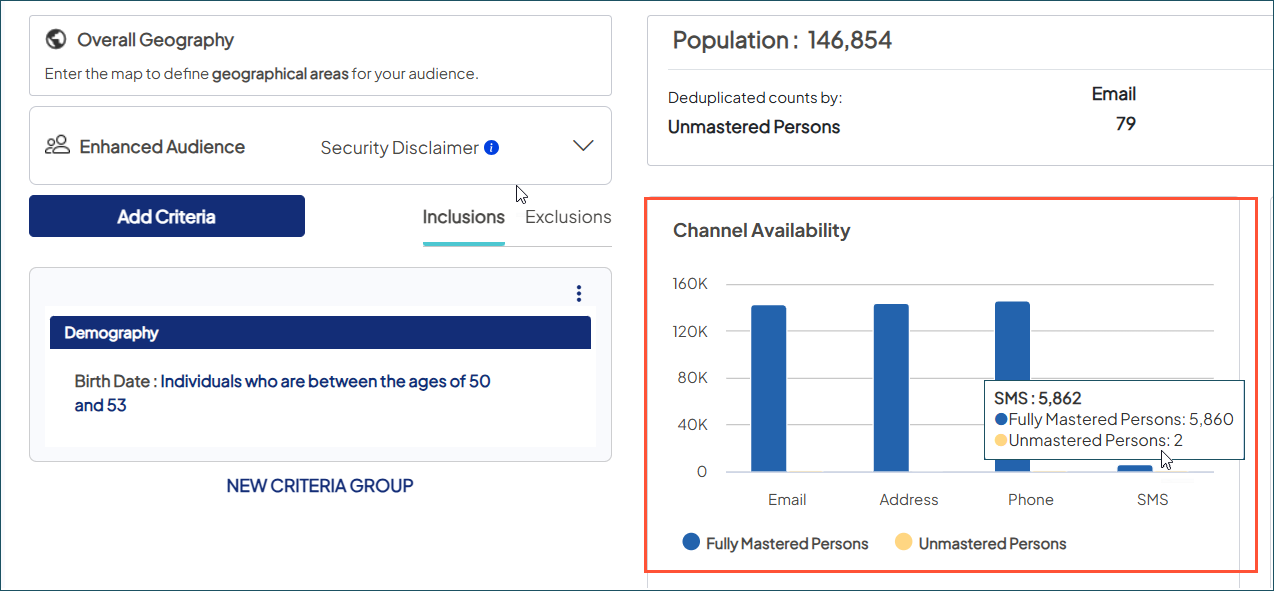
Audience Insights: In the Channel Availability chart, the volume for SMS now represents contacts with an SMS enabled-phone number and who’ve given marketing consent. With this stricter eligibility, counts may be lower initially but will increase as you grow your opted-in audience.
-
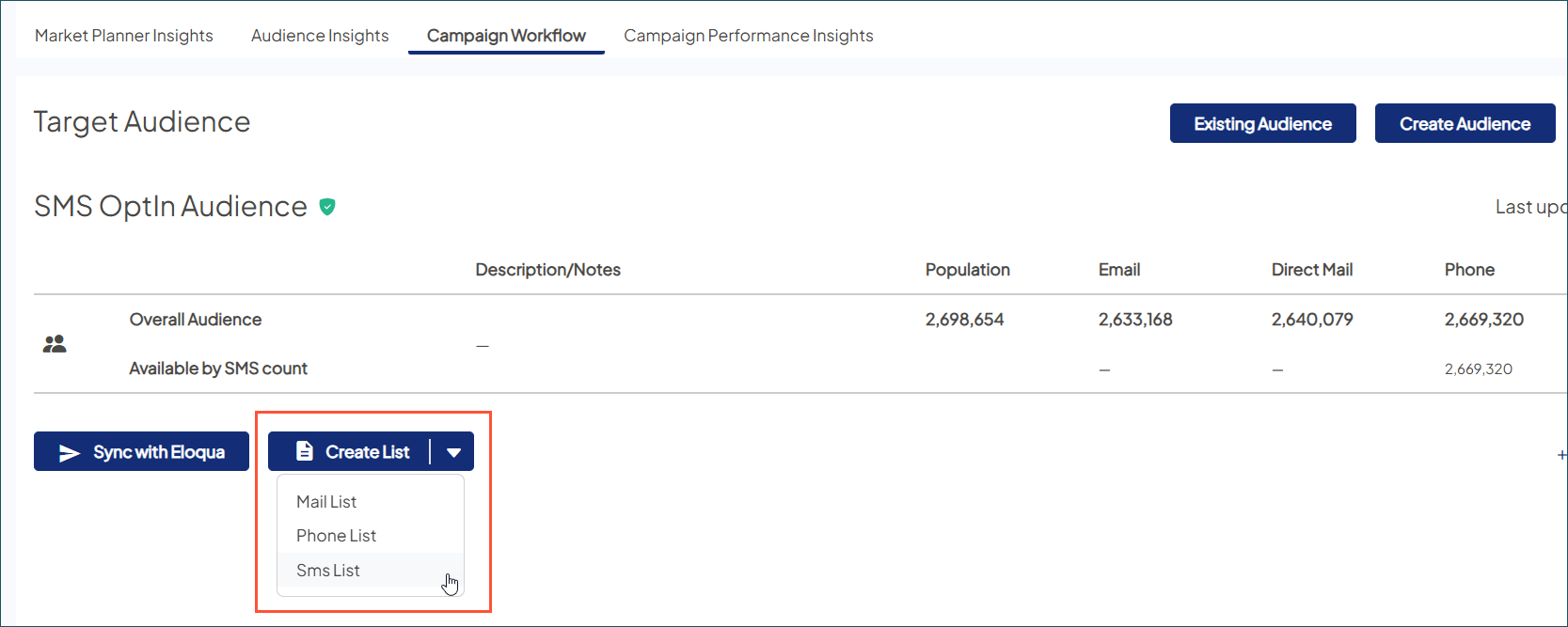
Campaign Workflow: When creating a list to download, the single dropdown option for Phone List (includes SMS) has been broken out into separate options for phone and SMS.
Select SMS List to export a file that automatically includes only phone numbers with active express consent. This file also includes new columns indicating which numbers (home or mobile) are opted-in, making it easy to segment for your SMS vendor.
Why it matters
- Be confident in compliance: Meet legal requirements with verifiable consent and auditability.
- Increase operational efficiency: Automated validation and filtering reduce manual list scrubbing and last-minute compliance checks.
- Boost campaign performance: Targeting only opted-in numbers ensures more of your texts reach their destination, improving deliverability and overall effectiveness.
- Build consumer trust: Respecting their preferences reinforces your brand’s reputation and fosters long-term engagement.
SMS reporting: See your reach, get more precise ROI
Now that you can bring SMS marketing activities into Ignite Growth Platform, it’s time to start understanding their impact. This release introduces the first of our SMS performance metrics within your existing campaign reports, while also giving you more control over ROI tracking.
What it is
To kick off our SMS reporting rollout, we’re leading with Reach — a key top-of-funnel metric that captures the unique number of individuals who successfully received your text message. View Reach for SMS alongside email and direct email to compare channels and optimize your marketing mix.
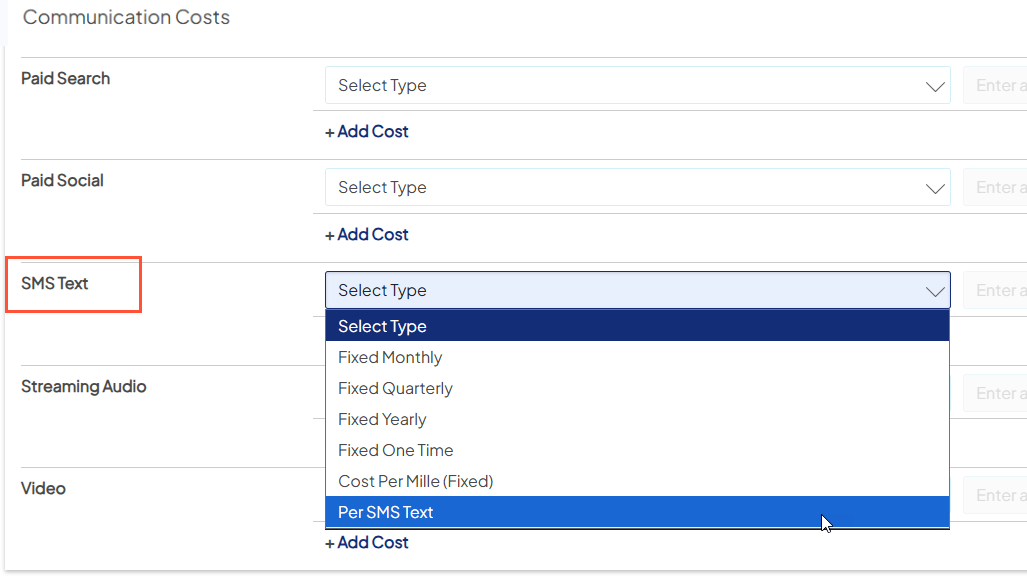
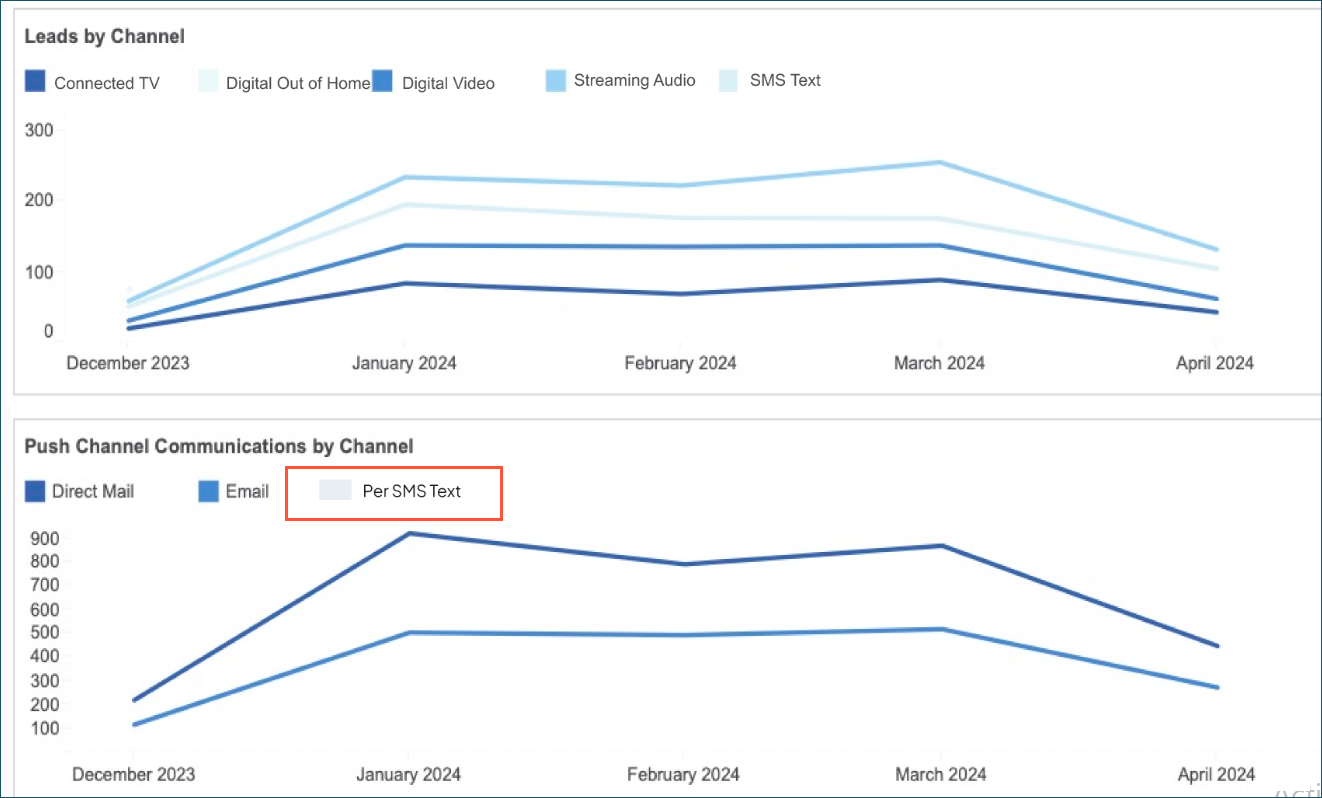
We’ve also updated the Cost Schedule with a new per SMS text option. This provides more flexibility to enter costs based on your SMS vendor billing, adding more precision to your channel and overall ROI.
How it works
Enable your new reporting
To surface SMS Reach and support per-SMS cost tracking, you’ll need to send your SMS activity data for ingestion into Ignite Growth Platform. If you haven’t set up this data source yet, contact your Account Manager to start the process with our implementation team. Once configured, you can use our new SMS Activity Data Submission Guide to ensure successful loading.
Add SMS campaign costs
Once SMS activities are flowing into your platform, you can use any existing fixed cost options or select the new Per SMS Text option to capture your investment.
View in the dashboards
You’ll see new SMS columns added to relevant tabs, alongside other channels used in the campaign:
-
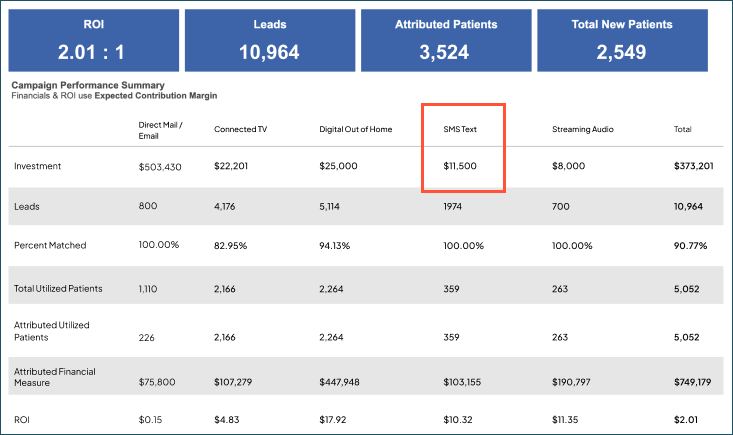
ROI Dashboard tab: SMS Text now appears with Per SMS Text investments next to existing channel metrics — Leads, Matched Patients, Utilized Patients, Financials, and ROI.
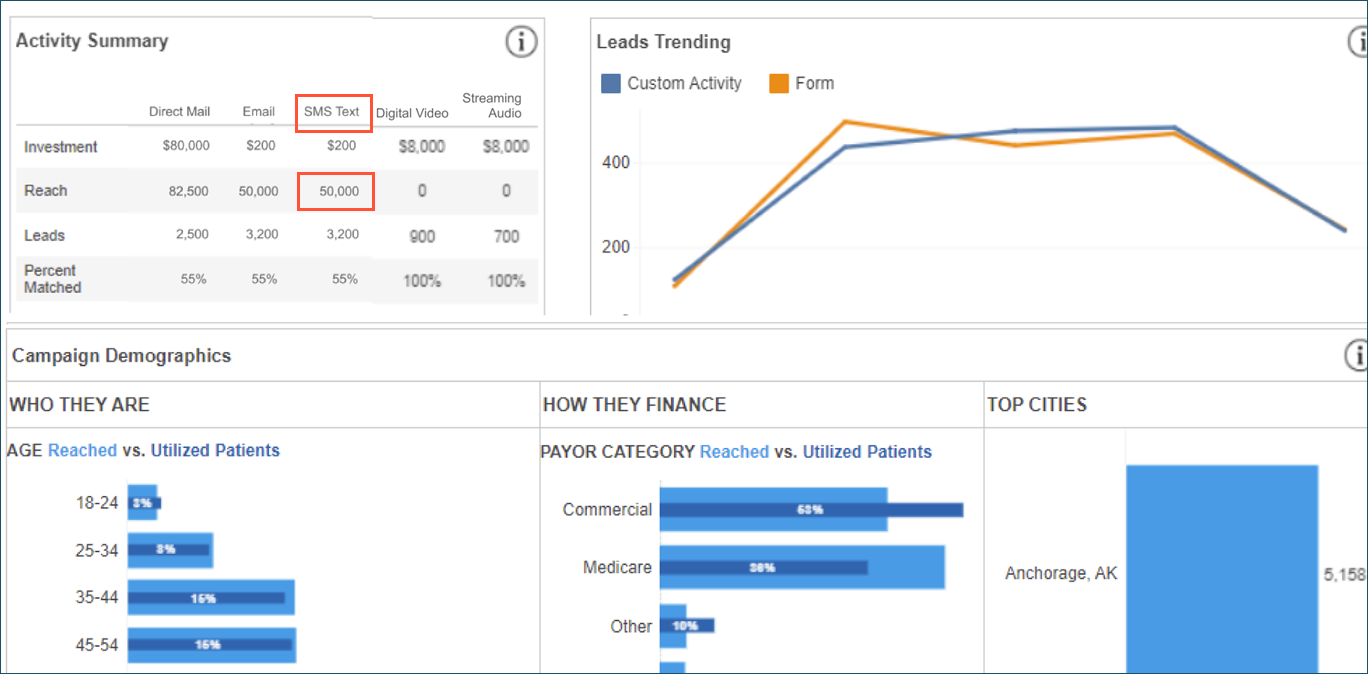
- Reach tab: SMS Reach is included in the Activity Summary as a deduplicated successful send activity.. Where available, SMS campaign demographics are included in the Who They Are, How They Finance, Top Cities, Gender, and Household sections.
- Trending tab: Push Channel Communications by Channel now includes SMS Text. This shows individuals that converted on a call to action derived from an SMS being clicked.
Why it matters
- Immediate, actionable value: Reach gives you a reliable starting point for evaluating SMS effectiveness.
- Improved ROI insights: You can see the impact of SMS investments more clearly at the channel and overall campaign level.
- Sets the stage for full-funnel reporting: Future phases will include clicks, conversions, opt-ins and opt-outs, and other essential metrics — providing a complete picture of SMS performance across your campaigns.
Limited release: Aggregate Reporting is here
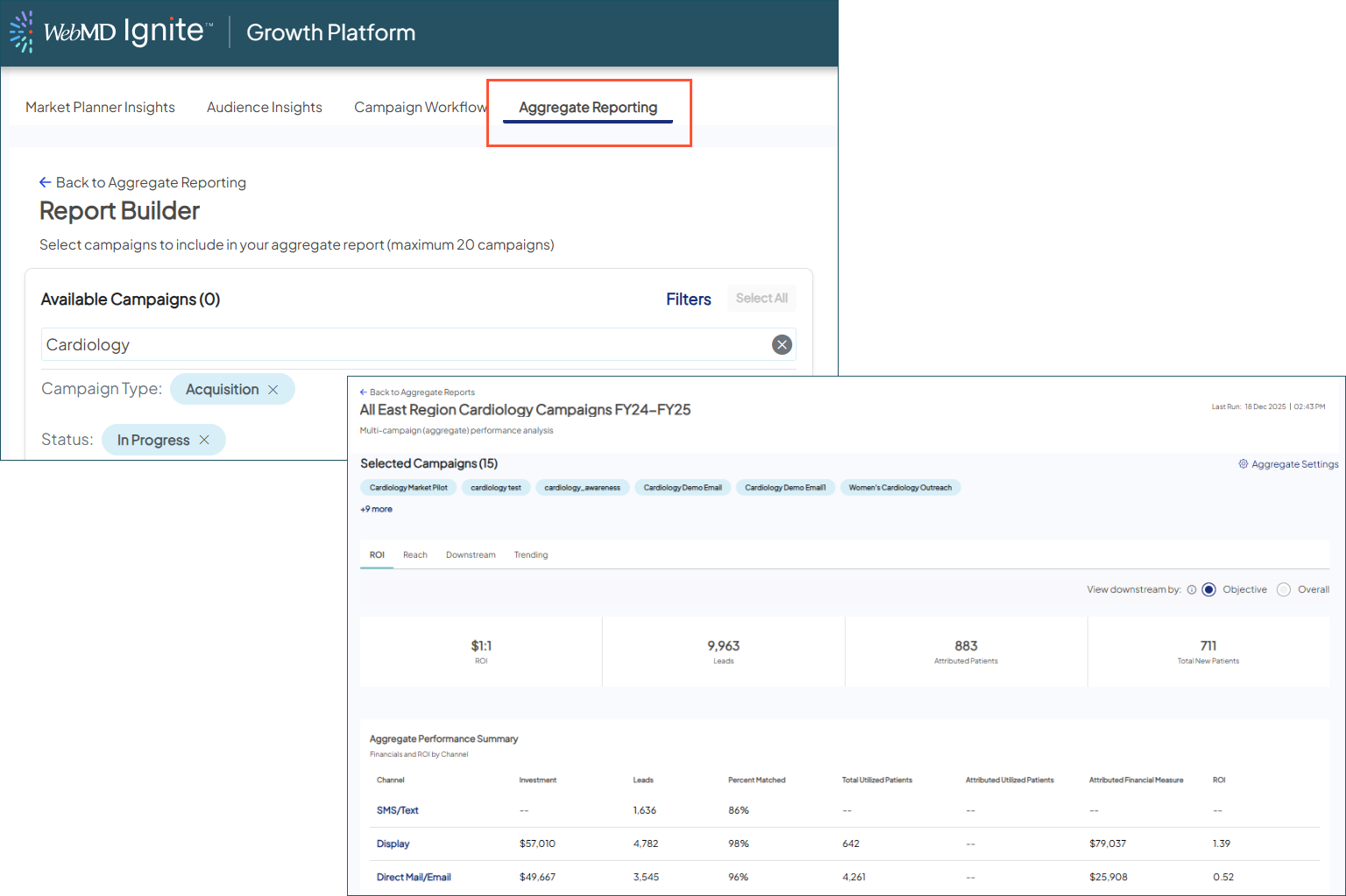
With updates like new campaign settings for default reporting, we’ve laid the groundwork. Now, our most requested new feature is available to early adopters for testing — before the full release early in the new year!
With Aggregate Reporting, you can group up to 20 individual campaigns into a unified view of performance, providing a clear, executive-ready view of your marketing impact.

Also check out the user guide for all the details and visuals!

NCOA for patient data: Accurate addresses, better results
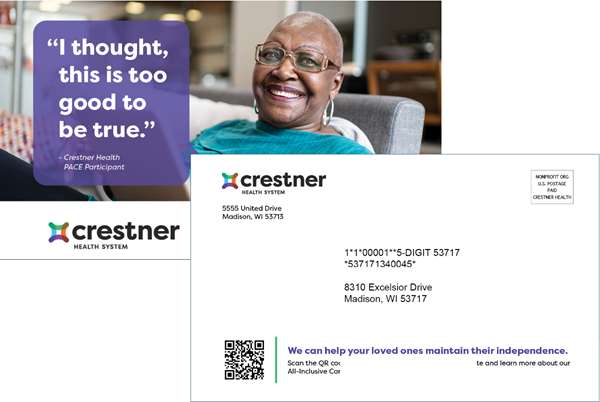
The same best-in-class National Change of Address (NCOA) processing used on our 3rd party consumer data can now be applied to your own supplied health system data. This expanded service improves the deliverability of your direct mail campaigns with the most up-to-date addresses available.
What it is
NCOA is a premium data enhancement service that automatically updates the mailing addresses in your Ignite Growth Platform database. By cross-referencing your provided data against the comprehensive, 48-month change-of-address registry from the U.S. Postal Service (USPS), we can identify people who have moved and instantly update their records.
For an even more complete view, we also leverage Epsilon’s Proprietary Change of Address (PCOA) to identify movers who may not have registered with the USPS.
How it works
This enhancement is designed as a seamless, always-on part of our data pipeline:
- Automatic processing: As your patient data enters Ignite Growth Platform, it will automatically run through NCOA. Any out-of-date addresses are flagged and/or updated, so when you build your audiences, all information is already verified.
- Continuous updates: To keep your data current, we will re-process your entire database at least every 80 days. This proactive approach ensures your audiences always meet the USPS Move Update requirement needed to qualify for postal discounts.
- Smart profiles: When an address is updated, our system recognizes the same person at a new location, preventing duplicate records.
Why it matters
- Boost your direct mail performance: Reduce returned mail and postage waste by ensuring your campaigns reach the right mailboxes the first time.
- Unlock valuable postal discounts: Create audiences certified for the USPS Move Update requirement, making you eligible for savings on First-Class and USPS Marketing Mail®.
- Achieve a cleaner, more accurate database: Automatically updating addresses reduces duplicates and strengthens your mastered profiles, giving you a more reliable dataset for campaigns.
- Increase efficiency and save resources: Spend less time and money managing returned mail, and focus more on strategic campaigns that drive results.

