Release notes: December 30, 2024
In this release: Introducing Unmastered Persons | Expanded digital channels

Unlock your marketing with Unmastered Persons
After early client testing—and impressive results—our next big feature is here. It’s a game-changer for lead generation, while opening up exciting new targeting and reporting opportunities in Ignite Growth Platform.
What it is
By popular request, you can now capture, retarget, and report on leads with as little as an email address or phone number—we’re calling these Unmastered Persons. Previously, you could only work with Mastered Persons (now also referred to as Fully Mastered Persons), which require a minimum of first name, last name, street address, and ZIP code to be actionable in your platform. Learn more about the differences and how to engage each.
How it works
Unmastered Persons expand and enhance your marketing capabilities from end to end:

Increase your leads
Now that less data is required to activate a person, you can choose to require less information on your webforms (or other lead capture tactics) to improve submission rates. Unmastered Persons can be created from a single form or HRA submission, inbound call, or custom activity, and ingested into your platform from any of those supported sources.


Retarget and nurture
In Audience Insights, you can now use the most basic contact information to build your lists and reengage your leads. We’ve made some key updates to guide you through the new workflow.
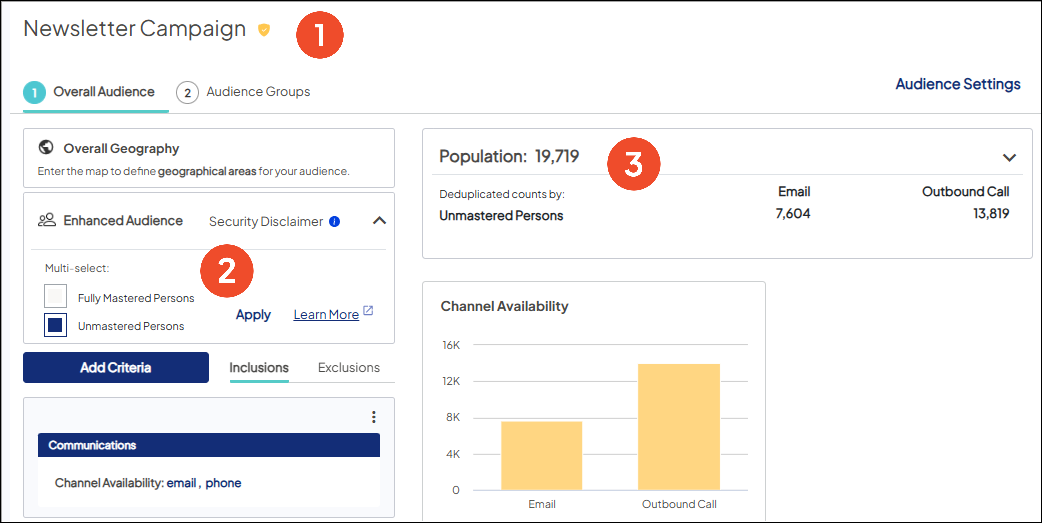

Shield icons: Indicate the type of audience you’re creating and what that means for your outreach
- Green = Mastered audience. Has more complete data, so you can communicate with targeted messaging based on their risk levels, relationship with your health system, etc.
- Yellow = Unmastered or mixed audience with Mastered. Has less complete data, so communicate with more general messaging (e.g., brand awareness, flu shots, etc.).

Enhanced Audience: When first setting up your audience, you can now choose to contact Unmastered Persons, Mastered Persons, or both, depending on campaign needs. This section allows you to easily change your initial selection.
- Shows your current audience type. Click to change as needed.
- Includes a quick link to review applicable criteria, since not all are relevant for each audience type. Criteria for Unmastered Persons is primarily activity focused.


Metrics: Offering new insights specific to Unmastered Persons.
- Population includes deduplicated counts by channel for an Unmastered audience; that is, all unique email addresses and/or phone numbers captured.
- Channel Availability shows yellow bars for the number of Unmastered Persons you can reach via email and/or phone. A mixed audience will also show blue bars for Mastered Persons, including those with reachable mailing addresses.

Recognize more revenue
For the first time in your platform, you can get downstream reporting on Unmastered leads for an expanded view of ROI and stronger justification for your marketing spend.
Introducing Lower-Confidence Linking
At a high level, we score every Unmastered Person record based on its similarity to an existing Mastered Person in your database (at a minimum, they must match on email address and/or phone number). The Unmastered Person record with the highest score is then associated (“linked”) to the Mastered record to attribute revenue from their encounters to the appropriate campaigns. Learn more about this methodology.
As noted, it’s important to think through what data you want to capture upfront, since it impacts your reporting. Consider:
- If you capture all the required fields for person mastering, you’ll have the highest-confidence ROI. This is especially important for bottom-of-funnel conversions, like appointment requests.
- If you capture less fields to match on, and rely on Lower-Confidence Linking for reporting, you’ll also be relying on lower-confidence ROI. Think top-of-funnel conversions, like newsletter signups, which are less about campaign objectives and more about securing and nurturing those leads.
Viewing results in your Campaign Dashboards
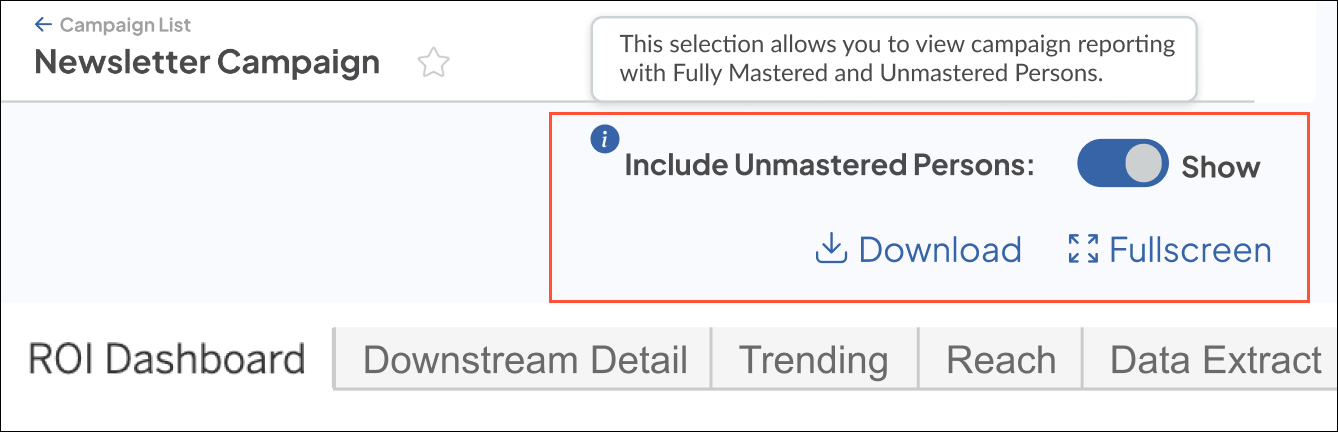
Simply switch on the new toggle in the top right to incorporate the logic, which allows you to view Unmastered Persons alongside your traditional Mastered campaign reporting.
Why it matters
Data mastering remains an essential part of Ignite Growth Platform, giving you confidence in who you’re targeting, how to best engage them, and how successful your campaigns are at impacting their behavior.
That said, we heard our clients’ need to lessen the requirements to create a person for retargeting and reporting. This feature addresses that feedback, and has already shown promising returns:
- With fewer required fields, our early adopters saw up to a 40% improvement in form completions.
- Using minimal contact information enabled new lead nurturing opportunities.
- Internal tests that included Unmastered Persons in reporting produced a 2 – 4x increase in ROI.
Ready to get started? Find new how-tos, FAQs, best practices, and more, right here in the Help Center!
Expand your insights with more digital media
Broaden your view of campaign performance with 6 new digital channels and more than 25 new sources for tracking and reporting in-platform. The release also allows for upcoming integrations to measure success at every stage of the funnel.
What it is
Our suite of supported channels now includes the newest options in bold*:
| Channel | Source |
|---|---|
| ConnectedTV | Hulu, Google, Max, Peacock, Paramount Plus, YouTubeTV, Other |
| Digital Out of Home | Billboards, Signage, Other |
| Digital Video | Online |
| Display | Bing, CareFinder, Display Search Extension, Edge, Google Adwords, Learning Center, Medscape, Physician Seeker, WebMD, WebMD TV, Yahoo, Other |
| Branded Email, HGCRM (deprecated), Ignite Growth Platform, WebMD | |
| Mass Media | Catalog, Magazine, Newspaper, Printed Publications, Radio, TV, Other |
| Native Display | Medscape, WebMD |
| Native Video | Medscape, WebMD |
| One2One | HGCRM (deprecated), Ignite Growth Platform |
| Organic Social | Facebook, Instagram, LinkedIn, Pinterest, X (formerly Twitter), Video, Other |
| Outbound Call | HGCRM (deprecated), Ignite Growth Platform |
| Outdoor | Billboards, Buses, Printed Items, Signage, Other |
| Paid Search | Bing, Edge, Google Adwords, First Impression, WebMD, Yahoo, Other |
| Paid Social | Facebook, Instagram, LinkedIn, Pinterest, TikTok, X (formerly Twitter), Video, WebMD, Other |
| SMS Text | HGCRM (deprecated), Ignite Growth Platform |
| Streaming Audio | Spotify, Pandora, Slacker Radio, iHeartRadio, Other |
| Video | Google Adwords, Medscape, Vimeo, WebMD, Other |
*Some WebMD Ignite sources, like Edge and Medscape, are used exclusively by our strategists for managed campaigns.
How it works
The new channels follow the same familiar workflow and reporting logic to capture response activity for your digital (pull) marketing.
Setting up tactics and tracking
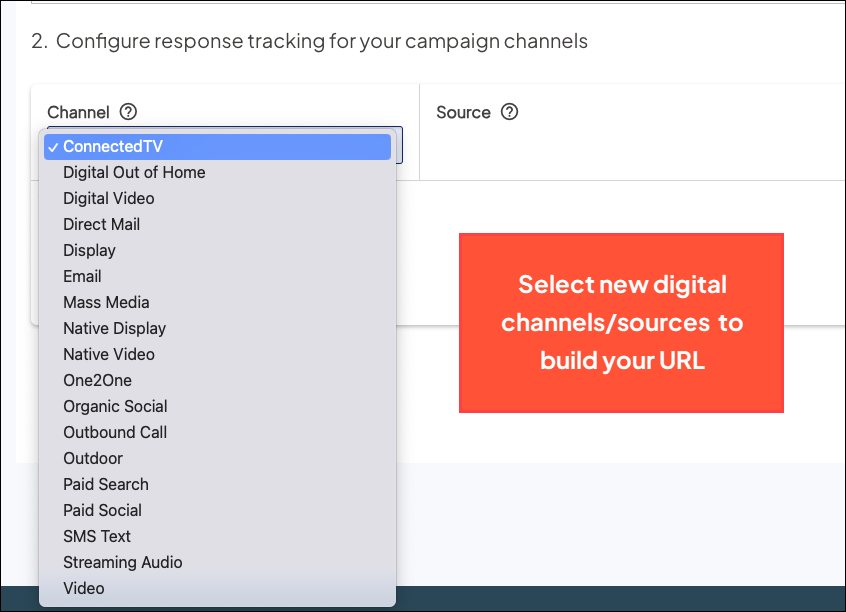
When configuring your response tracking, the Channel and Source dropdowns include the new options to create the trackable URL placed in your media.
Adding campaign costs
In Campaign Settings, we’ve updated the Cost Schedule with line items for each new option. As always, be sure to enter your investments and fixed costs for each tracked channel to ensure ROI can be reported.
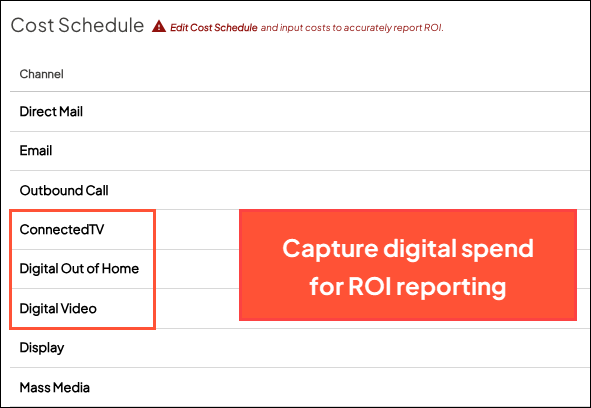
The new channels and your entries are carried through to the Cost Matrix tab in the Campaign Dashboards, where you can adjust them as needed for scenario-based reporting.
Viewing campaign reporting
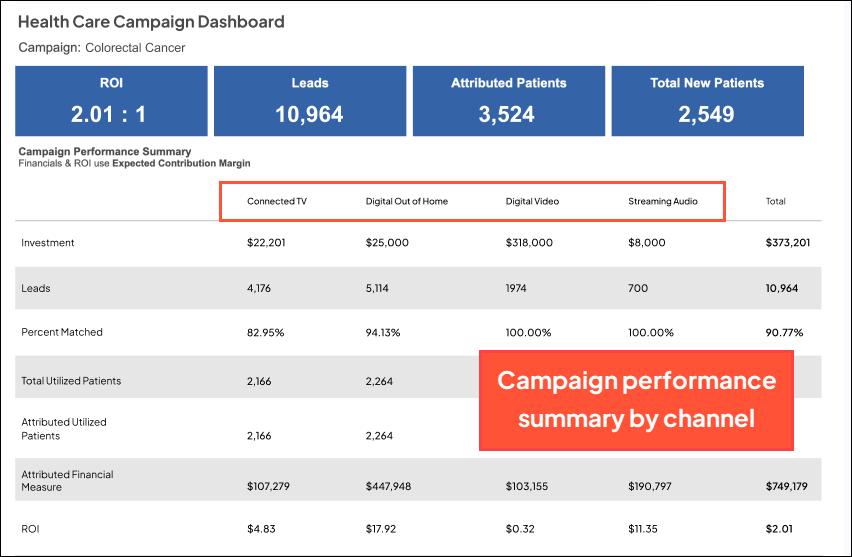
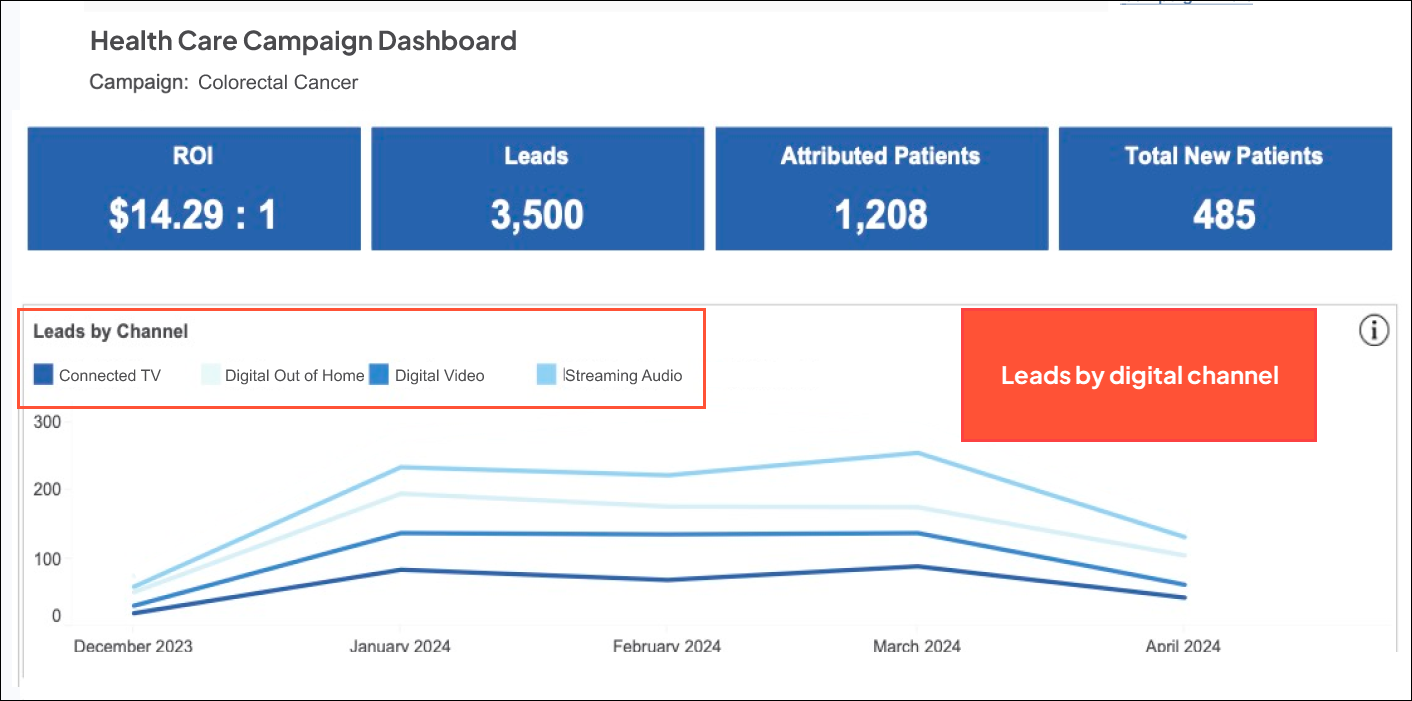
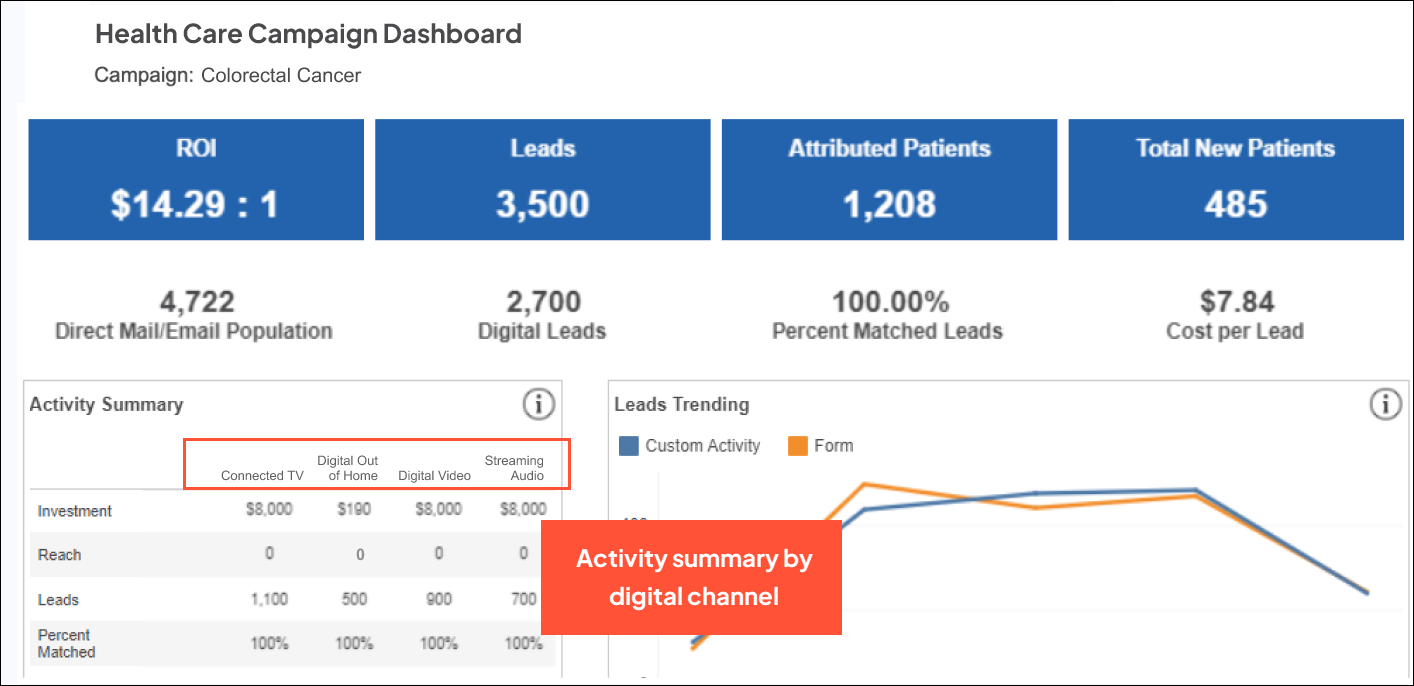
All ‘by channel’ visuals in the Campaign Dashboards have been expanded, giving you the breakdown of leads and downstream impact for each new tracked channel.
ROI Dashboard tab
Trending tab
Reach tab
Why it matters
The expanded channels improve your reporting capabilities now and in the near future:
- With this release, you can track channels across your digital marketing mix and attribute them directly to your campaigns. The new options also align with the channels used in Ignite managed campaigns, which we know have proven effective for our clients.
- Early next year, we’re adding integrations that deliver top-of-funnel digital KPIs—Impressions, Cost Per Click, Cost Per Lead, and more—so you can get channel-level reporting from the first engagement all the way down to your current encounter view. Stay tuned!

